

Standardise scoping and enforce capacity-led planning. That combination is the single fastest way agencies stop losing margin and start hitting delivery dates. A privacy-first platform such as Seventasks can support that shift, but the tool matters less than the discipline behind it. What follows is the full playbook: scoping checklists, capacity rules, client approval workflows, a tool-selection rubric, and the metrics that tell you whether any of it is working.
TL;DR:
- Agencies should develop a standardised scoping template that clearly defines deliverables, acceptance criteria, assumptions, exclusions, and review processes for better control.
- Accurate bottom-up estimating and choosing a pricing model aligned with scope stability, such as fixed, time and materials, or retainer, are essential for maintaining healthy margins.
- Weekly capacity checks and clear triage rules prevent overbooking and ensure priority projects are delivered on time without sacrificing internal or client deadlines.
- Structured feedback and approval workflows, with written sign-offs and limited review rounds, reduce revisions and scope creep, maintaining profitability.
- Using a project management tool that supports detailed scoping, scheduling, capacity planning, and client access without data selling or complex integrations is key for efficient workflow implementation.
Table of Contents
- What is agency project management, exactly?
- How do you scope, estimate and price agency projects?
- How much capacity does your agency actually have?
- How do you manage client feedback and approvals?
- How do you choose the right agency project management tool?
- How do you roll out a new process or tool without losing momentum?
- Which metrics actually tell you if agency project management is working?
- How Seven supports the agency workflows in this guide
- How do you track budgets and profitability across projects?
- Author perspective: priority actions for agency leaders
- Seven: a practical next step for agencies ready to tighten delivery
- Sources
What is agency project management, exactly?
Agency project management is the discipline of running client work as a series of scoped, resourced, and billed engagements rather than open-ended tasks. It differs from generic project management in one crucial way: every hour is either billable, written off, or absorbed into overhead, and every client touchpoint carries a relationship risk on top of a delivery risk. Get the process wrong and you don't just miss a deadline. You erode margin and trust in the same move.
The core components of agency project management cover five functional areas, and most agencies are strong in one or two and shaky everywhere else.
Work intake and triage. Every new request, whether it's a full campaign brief or a one-line "can you tweak this" from a client, needs a consistent intake record: requester, objective, deadline, budget ceiling, and priority tier. Without a standard intake field set, half your projects start with someone's memory of a phone call instead of a written brief. Agency-focused how-to guides consistently flag this as the first place agencies lose control of scope.
Scoping outputs and acceptance criteria. A brief that says "redesign the website" is not a scope. A scope says what pages, what deliverable formats, what the client will review, and what "done" looks like. Ambiguity here is where scope creep is born, and it's almost always cheaper to spend an extra hour scoping than to spend three unpaid hours later arguing about what was "obviously included."
Task-level estimating with a named owner. Break the deliverable into tasks small enough that one person can estimate them with confidence, ideally under a day each. Every task needs an owner from day one, not "the design team" as a placeholder. Vague ownership is how tasks stall for a week before anyone notices.
Scheduling conventions. Milestones, internal handoffs, and client-facing review points need to sit on a shared calendar view, not buried in someone's inbox. Handoffs are where agencies bleed time: a design file sitting "ready for review" for four days because nobody flagged it is a capacity problem disguised as a scheduling problem.
Roles and responsibilities. Someone owns delivery. Someone owns the client relationship. Someone owns approvals. In small agencies these might be the same person, but the roles still need to be explicit, because ambiguity about who signs off on scope changes is exactly what lets clients quietly expand a project for free.
A few practical fields worth locking into every project template:
- Client, project owner, and account lead, with names, not team labels
- Scope summary and acceptance criteria, written in one paragraph a client could read
- Budget ceiling and billing model (fixed, time and materials, or retainer)
- Key milestones with client-facing review dates flagged separately from internal ones
- A single point of truth for files and feedback, so version control doesn't happen by accident in email threads
Get these five areas standardised once, in a template you reuse, and most of the day-to-day chaos in agency delivery disappears. The rest of this guide builds directly on top of that foundation.
How do you scope, estimate and price agency projects?
Scoping and estimating are the two skills that separate agencies with healthy margins from agencies that are permanently "busy but not profitable." Get them right and pricing becomes a formality. Get them wrong and no amount of clever project tracking will save the margin.
Start with a scoping checklist, applied to every project regardless of size:
- List every deliverable by name and format — not "website" but "12-page responsive site, Figma handoff, two rounds of design review."
- Write acceptance criteria for each deliverable — the specific condition under which the client can say "yes, that's done."
- Document assumptions — the things you're taking as given, like "client supplies final copy" or "no more than three stakeholders in review."
- Document exclusions explicitly — printing, translation, extra languages, whatever's commonly assumed to be included but isn't.
- Confirm the review and revision structure — how many rounds, and what happens past that number.
Once scope is locked, estimate from the bottom up. Break the project into tasks, estimate hours per task against your rate card, and roll those up into a total. Bottom-up estimating is slower than pattern-matching against "the last job like this," but it's far more accurate, and it gives you a defensible number when a client asks why the quote is what it is. Agency project management guides treat this step, alongside capacity planning, as the foundation of predictable delivery.
Pricing model choice depends on how well-defined the work is:
- Fixed price works when scope is genuinely stable and well understood, such as a template-based deliverable you've built variations of before. It protects the client from overruns and protects you if your estimate is accurate. It punishes you badly if it isn't.
- Time and materials suits discovery-heavy or evolving work, like a strategy engagement where nobody quite knows what the final deliverable looks like on day one. It shifts scope risk to the client, which is fair when the ambiguity is genuinely shared.
- Retainers fit ongoing relationships with a roughly steady monthly workload, such as social content production or ongoing paid media management. They smooth revenue but require honest capacity tracking, because retainer clients have a habit of quietly expanding their asks month over month.
Whichever model you use, build in a change-order workflow before you need one. When a client asks for something outside the agreed scope, the request gets logged, estimated, and approved in writing before work starts, even if it's "just a quick tweak." A one-line change order template, with the added hours and cost, takes two minutes to fill out and saves the argument that would otherwise cost you both the time and the goodwill.
How much capacity does your agency actually have?
Most agencies plan work against a calendar and hope capacity works itself out. It doesn't. Forecasting, which looks weeks or months ahead at demand, and scheduling, which allocates specific hours to specific people this week, are two different exercises, and agencies that only do one of them are flying half-blind.
Forecasting tells you a busy quarter is coming before it arrives, so you can hire, subcontract, or say no to new work early rather than at the point everyone's already burnt out. Scheduling tells you whether Thursday is actually survivable given what's already committed. Skip forecasting and you're always surprised. Skip scheduling and your forecast is meaningless because nobody's actually tracking whether the plan matches reality.
A few concrete capacity checks worth running weekly rather than "when things feel bad":
- Compare each team member's booked hours against their available hours, not against a vague sense of how busy they seem.
- Set a utilisation target per role (creative teams often run lower than account or production roles, and that's fine, not a failure) and flag anyone consistently over or under it.
- Protect a fixed block of unbookable time per week, even fifteen percent, for internal meetings, admin, and the inevitable fires. Scheduling someone at 100% booked capacity guarantees the first urgent request breaks the plan.
- Split multi-role tasks properly. A task that needs four hours of design and two hours of copy is two allocations against two calendars, not one vague four-to-six-hour block sitting against "the team."
Pro Tip: When a task spans two roles, log it as two linked subtasks with separate owners and separate hour estimates. It's a small habit, but it's the difference between knowing exactly where a delay happened and just knowing "the project" is late.
When capacity genuinely breaks, and it will during a busy stretch or when someone's off sick, you need triage rules decided in advance, not negotiated in a panic. A simple rule set: client-facing deadlines take priority over internal polish work, retainer clients with contracted SLAs take priority over one-off projects unless a one-off has a hard external deadline (a launch date, a media booking), and any project that slips gets a same-day client notification, not a surprise on the due date. Agencies that handle crises well aren't the ones with more slack. They're the ones who decided the rules before the crisis started.
How do you manage client feedback and approvals?
Feedback and approval cycles are where agency projects either stay profitable or quietly bleed hours nobody ever bills for. The fix isn't more patience with clients. It's structure that makes the process predictable for both sides.
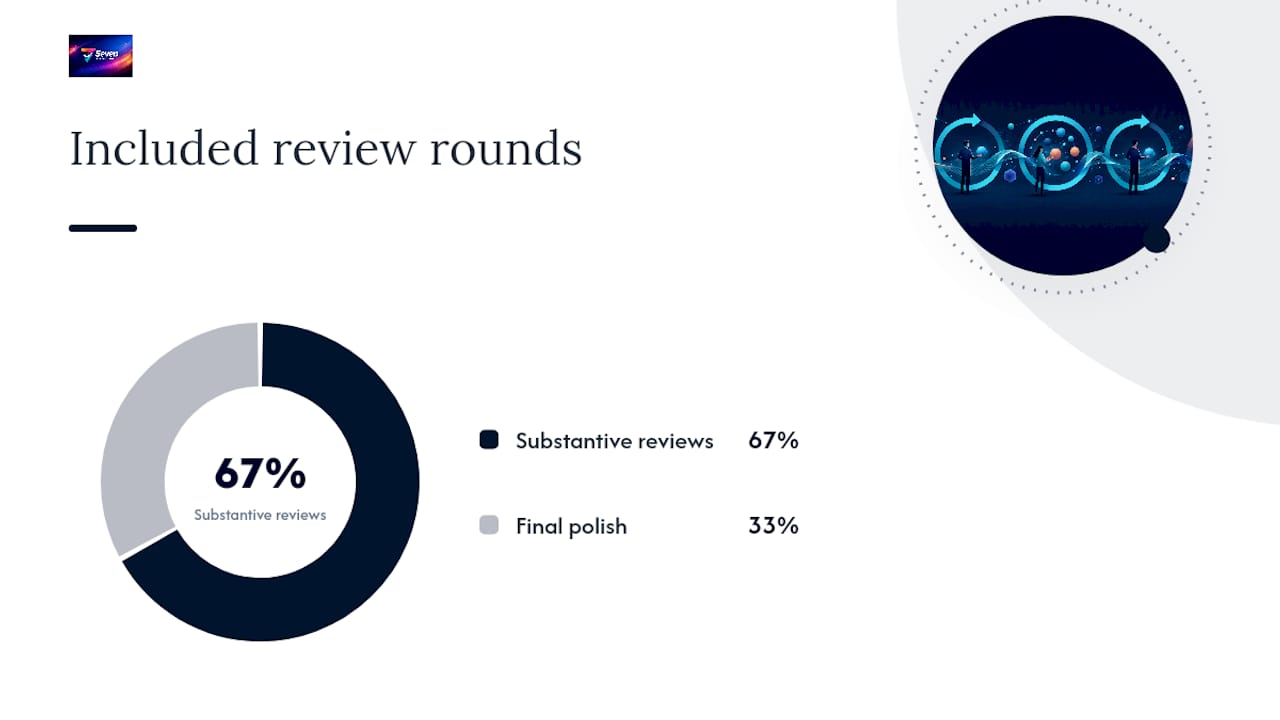
Set the number of review rounds in the scope document itself, typically two rounds of substantive feedback plus one round of final polish, and state plainly what happens beyond that: additional rounds are billed at your standard rate or capped hours. Clients rarely push back on this when it's written down before work starts. They push back constantly when it's introduced after round four has already happened for free.
A few practices that consistently reduce revision churn:
- Brief every deliverable with the same structure every time, so feedback comes back against specific, named elements rather than a vague "make it pop."
- Keep one single source file or link for review, never five email attachments with slightly different filenames circulating at once.
- Version everything, and label versions in plain language a client understands (v1 draft, v2 client review, v3 final) rather than internal file-naming conventions nobody outside the team can parse.
- Give clients a scoped dashboard view rather than access to the full internal project. Product research on client-facing tools backs this up: limiting visibility to what's actually relevant to the client reduces confusion and cuts down on off-scope requests that creep in simply because a client can see internal work-in-progress notes.
Formal sign-off matters more than most agencies treat it. A verbal "looks good" in a meeting is not an approval record. Require written sign-off, even a one-line email or an in-app approval click, before a deliverable moves to the next stage. This single habit stops the most common source of scope disputes: a client claiming a piece of work was never actually approved, or approved with conditions nobody wrote down. If it wasn't signed off, it isn't done, and any extra work built on top of an unapproved draft is, by definition, extra.
How do you choose the right agency project management tool?
Choosing agency software goes wrong most often because agencies shop for features before they've defined their own priorities. The right approach is to score candidates against a rubric built from how your agency actually works, not a generic checklist copied from a review site.
Evaluate any tool against these categories:
- Briefs and scope handling — can it hold a structured brief with acceptance criteria, or is it just a task list with a description field?
- Scheduling and milestones — does it show client-facing dates separately from internal ones?
- Capacity and resource planning — can you see utilisation per person, not just per project?
- Time tracking — is logging hours fast enough that your team will actually do it, because a time-tracking feature nobody uses is worse than none at all?
- Client proofing and permissioning — can you expose a scoped view to clients without giving them the run of the internal workspace?
- Integrations — does it connect to the accounting or CRM tools you already depend on?
- Data portability — can you get your data out in a usable format if you switch platforms later?
- Pricing transparency — is the cost per seat clear, or does it require a sales call to find out?
- Security and privacy — does the vendor train models or sell analytics on your client data, and does that sit comfortably with your own client confidentiality obligations?
Weighting shifts by agency size. A three-person shop should weight briefs, scope, and pricing transparency heavily and barely care about enterprise reporting. A fifty-person agency should weight capacity planning and integrations much higher, because manual reconciliation across five disconnected tools starts costing real hours at that scale. Larger, enterprise-style platforms lean hard into combining resource planning with rate cards and margin reporting, which is genuinely useful once you're managing dozens of concurrent projects, but it's overkill and often overpriced for a small team that mainly needs clear scoping and a shared calendar.
Watch for red flags that should stop a purchase outright: locked or limited data export, pricing that only appears after a demo call, permission settings too blunt to separate client and internal views, and no native time tracking at all.
| Decision factor | Favours single platform | Favours best-of-breed stack |
|---|---|---|
| Team size | Small to mid-size teams wanting one login | Larger teams with specialised needs per function |
| Budget | Tighter budgets, fewer subscriptions to manage | Budget allows multiple tool subscriptions |
| Complexity of client base | Straightforward client roster, similar project types | Highly varied clients needing specialised proofing or reporting |
| Data ownership priority | High, fewer systems to export from | Lower, data spread across multiple vendors |
For most creative and marketing agencies under fifty people, a single platform that combines scoping, scheduling, capacity, and client-facing views beats stitching together five specialised tools. The feature priorities agencies consistently ask for, proofing, client access, time tracking, and capacity visibility, are exactly the areas where a fragmented stack tends to create the most reconciliation work.
How do you roll out a new process or tool without losing momentum?
Rolling out new agency project management processes fails most often not because the process is wrong, but because it's introduced everywhere at once. A phased rollout beats a big-bang launch almost every time.
- Pilot with one team and one project type. Pick a project that's representative but not mission-critical, run the new process end to end, and set a measurable success criterion in advance, such as "estimate accuracy within 15% of actuals" or "zero missed client review deadlines."
- Review the pilot honestly before scaling. If the pilot revealed the templates were wrong or the tool didn't fit how the team actually briefs work, fix that before rolling out to a second team, not after.
- Train by role, not as a single all-hands session. Account managers need to know how to set up a client-facing view. Production staff need to know how to log time and update task status. A single generic training session leaves both groups half-prepared.
- Build quick-start guides and set recurring office hours for the first month, so questions get answered as they come up instead of festering until someone quietly reverts to their old spreadsheet.
- Migrate data carefully. If you're moving from spreadsheets, import one recurring project first as a test case, map your rate-card fields before anything else, and check estimated versus actual hours on a handful of projects before committing to a full cut-over. This mirrors the practical migration approach most agencies use when moving from ad hoc spreadsheets into a structured platform.
- Set governance early, including naming conventions for projects and tasks, a standard template library, and a 30/60/90 day review to check whether the new process is actually being followed or has quietly drifted back to old habits.
None of this needs to take months. A tight pilot, honest review, and staged training usually gets a mid-size agency fully switched over within a single quarter.
Which metrics actually tell you if agency project management is working?
Five metrics matter more than the rest, and most agencies track at most two of them.
- Utilisation — the percentage of available hours actually booked to billable or productive work. Track it per person, not just as an agency-wide average, because averages hide the one person quietly working sixty hours while another sits at forty percent.
- Billable rate — the effective rate you're actually recovering per hour once discounts, scope creep, and unbilled extras are accounted for. This number is often uncomfortably lower than your rate card, and that gap is exactly where profitability leaks out.
- Estimate accuracy — how close your bottom-up estimates land to actual hours spent, tracked project by project. Consistent overruns on a particular project type tell you your estimating process for that category is broken, not that the team is slow.
- Margin per project — revenue minus cost, calculated per project rather than only at the agency level, so you can see which project types are quietly subsidising others.
- On-time delivery rate — the share of milestones hit against the originally committed date, not a renegotiated one.
Set a simple weekly ritual: project leads scan estimate-accuracy and utilisation exceptions, flag anything more than 20% off target, and discuss the outliers in a fifteen-minute stand-up rather than waiting for a monthly report that arrives too late to act on.
Grouping projects into cohorts, by client type, project category, or team, surfaces patterns a single-project view hides.
Run improvement as small experiments rather than sweeping overhauls: change one variable, like adding a buffer to design tasks or shortening review rounds, measure it against the next handful of projects, and keep what works.
How Seven supports the agency workflows in this guide
Seventasks was built around the exact gap this guide keeps circling back to: agencies need scoping, scheduling, and client-facing clarity in one place, without their client data being mined, analysed, or sold. Seventasks doesn't train models on your workspace content and doesn't sell analytics, which matters when the "client" in your client-facing dashboard is a competitor's marketing team.
Practically, that shows up as:
- Flexible workspaces and boards you can structure around client accounts, project types, or team divisions.
- Task and subtask management with due dates and overdue alerts, so a stalled handoff shows up before it becomes a missed milestone.
- Built-in messaging and file attachments, keeping brief discussion and feedback attached to the actual task instead of scattered across email.
- Excel import, which lets an agency migrate existing estimates and task lists directly rather than rebuilding everything by hand.
- Open data export, so switching later, if you ever need to, doesn't mean losing years of project history.
A typical migration follows the pattern outlined for small teams moving off spreadsheets: export your current task list to a spreadsheet, map columns to Seventasks fields (task, owner, due date, status), import a single active project as a test, and check it against the original before moving the rest of your workload across.
The agencies that get the most out of a new project tool aren't the ones with the fanciest workspace setup. They're the ones who imported one real project first, checked the numbers against what actually happened, and only then moved everything else across.
Next steps are straightforward: start a trial, import one live project from a spreadsheet as a test case, and check the setup documentation for rate-card and workspace configuration before rolling it out agency-wide.
How do you track budgets and profitability across projects?
Budget management in an agency setting means tracking two numbers against each other constantly: what you quoted and what it's actually costing to deliver. Most agencies check this at project close, when it's far too late to do anything but note the loss.
Track budget consumption against percentage of work completed, not against calendar time elapsed. Catching that gap in week two, not week six, is the entire point of tracking it weekly rather than at milestones.
Separate true costs from the quoted price at the task level where you can. If a "quick logo tweak" task keeps eating hours across three projects in a row, that's a pattern worth pricing differently next time, not a series of unrelated one-off surprises.
Profitability tracking works best when it's tied to the same task-level data used for estimating in the first place. If your estimates and your actuals live in the same system, margin per project becomes a live number instead of something finance reconstructs weeks after delivery. That live view is also what makes change orders easy to justify: when a client asks for extra work, you can show, in real numbers, exactly what it costs to say yes.
Retainers need a slightly different lens.
Author perspective: priority actions for agency leaders
If you take one thing from this guide, standardise scoping before you touch anything else. A capacity audit and a single proofing workflow pilot come next, in that order, not scattered across six initiatives at once.
For the next 30 days: lock a one-page scoping template, run it on every new project, and track estimate accuracy against actuals for a handful of jobs. For the next 90 days: run a capacity audit across the whole team, set utilisation targets by role, and pilot a scoped client dashboard on one account before rolling it out further.
Most agencies already know their process has gaps. The ones that actually close them are the ones who pick one change, measure it honestly, and resist the urge to fix everything simultaneously.
— Greg
Seven: a practical next step for agencies ready to tighten delivery
Seventasks gives agencies the scoping-to-delivery workflow this guide describes, without the vendor lock-in that makes switching tools later a painful, data-losing exercise. Pricing is transparent with affordable per-user rates for individuals and teams, with no hidden tiers and no analytics sold on the side.

A sensible pilot looks like this: pick one active client project, migrate its task list and estimates from a spreadsheet using Excel import, include your project lead and one production team member in the pilot, and set success criteria before you start, such as "every task has an owner and due date within week one" and "estimate accuracy tracked against actuals by project close." If that pilot holds up, scale it across the rest of your client roster with the same template.
Start a free trial and bring one real project across at Seventasks to see whether the workflow fits before committing agency-wide.
Sources
- How to Run Agency Project Management in 2026? Full ...
- 10 Best Creative Agency Project Management Software 2026