

Privacy-focused project management means keeping full ownership of your project data, with no vendor tracking, no analytics harvesting, and encryption you can actually verify. Most teams should default to a privacy-first SaaS with client-side encryption unless they have real operations capacity, in which case self-hosting an audited open-source tool becomes worth the maintenance load.
TL;DR:
- Most teams should use a privacy-first SaaS with client-side encryption unless they have operational capacity for self-hosting an open-source tool.
- Verifiable signals such as architecture documentation and published threat models are essential to confirm a tool’s actual privacy guarantees.
- Self-hosting provides full control but shifts security responsibilities onto the user, often making it less secure without disciplined maintenance.
- Conduct thorough vetting, including testing export and recovery functions and reviewing privacy policies before rolling out new tools.
- Seventasks offers a privacy-focused SaaS with full data export, no analytics resale, and transparent pricing, suitable for teams seeking a balance between control and convenience.
Table of Contents
- What does privacy focused project management actually mean?
- What technical features prove a tool is actually private?
- Should you self-host or use privacy-first SaaS?
- How do you vet and pilot a privacy-first tool before rollout?
- Why Seven is a privacy-first option worth trying
- How do GDPR and CCPA apply to your project data?
- What training and policy keep project data private day to day?
- How do you collaborate securely without leaking sensitive data?
- Do privacy needs differ by project type or industry?
- Practitioner perspective: balancing security, ops and budget
- Try Seven for privacy-first project management
- Sources
- FAQ
What does privacy focused project management actually mean?
Privacy-focused project management is not a marketing label. It describes a specific set of guarantees: your task data, client names, and file attachments stay under your control, nobody outside your organisation can read them without permission, and the vendor cannot quietly repurpose them for advertising or model training.
A few terms get thrown around loosely, so here's what they should mean in practice:
- Client-side encryption scrambles data on your device before it ever reaches a server, so even the host can't read it.
- Zero-knowledge means the provider genuinely cannot decrypt your content, not just that they promise not to look.
- Offline-first means the app works fully without an internet connection and syncs later, which usually implies data lives locally first.
- Telemetry is the background usage data apps send home. Many privacy-first tools disable it entirely or make it opt-in and auditable.
The point of all this is threefold: confidentiality of what's actually in your boards and tasks, control over where that data lives and who can export it, and auditability, meaning you or a third party can check the claims rather than trust them blindly. Privacy Guides curates tools against exactly these criteria, which is a faster way to separate genuine privacy engineering from a vendor's privacy page copy.
What technical features prove a tool is actually private?
Marketing claims are cheap. Verifiable technical signals are what separate a genuinely private tool from one that just says the right words on its homepage.
Start with encryption. If a vendor claims client-side or end-to-end encryption, check whether encryption happens on your device before transmission, not just "in transit" via standard TLS, which protects data moving across the internet but not from the vendor itself. Zero-knowledge claims should be backed by a published architecture, not a footnote. MSKanban, a self-hostable Kanban tool, documents its encryption design openly: Argon2id for key derivation and XChaCha20-Poly1305 for content, alongside a public threat model and architecture decision records. That level of detail is rare, and it's exactly what you should be hunting for in any vendor's documentation.
Authentication matters just as much as encryption. Look for:
- WebAuthn or passkey support, which removes password-reuse risk entirely.
- Two-factor authentication as standard, not a paid add-on.
- Role-based access control, so not every team member can see every board.
Offline-first tools store data locally, which is great for privacy but shifts backup responsibility onto you. Ask what happens to that local copy if a device is lost. On data portability, check the export format (CSV, JSON, or a proprietary blob) and whether "delete" actually destroys encryption keys (crypto-shredding) rather than just hiding records.
Pro Tip: Before trusting any zero-knowledge claim, search the vendor's public repository or documentation for the words "threat model" or "ADR". If neither exists, the claim is unverified marketing, not engineering.
Should you self-host or use privacy-first SaaS?
The deployment model you choose matters more than any single feature, because it determines who is actually responsible for keeping your data safe day to day.
- Self-hosted tools give you complete data sovereignty. Nothing leaves your infrastructure unless you move it. But this control comes with a catch: self-hosting shifts the entire security burden onto you. Without a disciplined patching schedule, tested backups, and someone watching logs, a neglected self-hosted instance can end up less secure than a well-run commercial service.
- Privacy-first SaaS removes the operational load. Someone else patches the server and manages uptime. The trade-off is trust: you need to verify the provider's zero-knowledge or client-side encryption claims rather than take them on faith, because you can't inspect their infrastructure directly.
- Offline-first apps suit individuals or small teams doing device-only work, where syncing across multiple people introduces its own risks. Check how conflict resolution works when two people edit the same task offline. Poor sync logic can silently overwrite work.
- Hybrid setups split the difference. Managed hosting of an open-source tool, or a private cloud instance run by a specialist, gives you sovereignty without the full weight of running infrastructure yourself.
None of these is universally right. A two-person consultancy has different needs from a 40-person agency handling client contracts, and the honest answer is usually "it depends on who's available to do the ops work."
How do you vet and pilot a privacy-first tool before rollout?
Rolling out any new tool blind is a mistake. Rolling out a privacy tool blind defeats the entire point of choosing it.
- Review the repository and documentation first. Look for a published threat model, architecture decision records, and any note of third-party audits. If a project has none of this, treat its privacy claims as unverified.
- Run a scoped pilot. Load a small, non-sensitive project first. Test the export function immediately, don't wait until you're locked in with months of real data.
- Rehearse backup and recovery before you need it. Trigger a restore from backup in a test environment. If you can't recover data cleanly on a Tuesday afternoon with no pressure, you won't manage it during an actual incident.
- Check the contract, not just the product page. Confirm data processing terms, your right to export everything at any time, and what "delete" contractually guarantees.
- Set an operational cadence if self-hosting. Patch on a schedule, review access permissions quarterly, and document what happens if an admin loses their recovery key.
Pro Tip: Test your export function before you migrate a single real project, not after. Plenty of teams discover a tool's "open export" is a partial CSV missing attachments and comments, only after they've already committed six months of data.
For teams still building out lightweight workflows around a new tool, a guide to minimalist project management for small teams pairs well with this checklist. Privacy and simplicity tend to reinforce each other.
Why Seven is a privacy-first option worth trying
Seventasks was built by an independent team with one deliberate constraint: no data mining, no analytics resale, and no using your project data to train anything. That's the whole business model, not a feature bullet.
What that looks like in practice:
- Full data export with no lock-in, so leaving is always an option, not a negotiation.
- Flexible workspaces and boards for organising tasks and subtasks without forcing a rigid structure on your team.
- Built-in messaging and file attachments, so sensitive conversations don't have to leave the platform for a separate chat tool.
- Excel import for migrating existing project data without manual re-entry.
For teams wanting to verify SaaS privacy claims before trusting any provider, Seventasks has published a checklist for confirming tracking-free SaaS, and a piece on running a privacy-first dashboard for project status tracking that's worth reading alongside your own vetting process.
How do GDPR and CCPA apply to your project data?
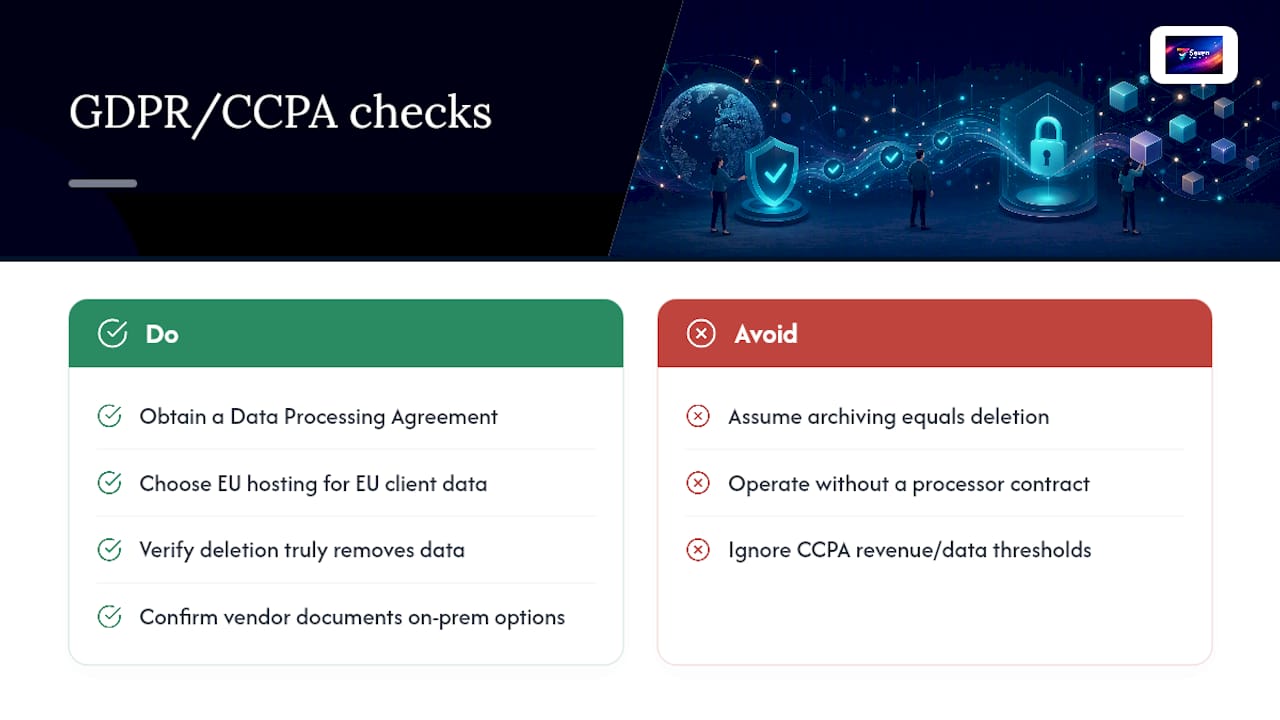
Project management data is personal data the moment it includes names, email addresses, client details, or employee performance notes, which is nearly always. That puts most teams squarely inside the scope of the General Data Protection Regulation (GDPR) if they operate in or serve the EU/EEA, or the California Consumer Privacy Act (CCPA) if they handle data of California residents.
GDPR requires a lawful basis for processing, a documented data processing agreement with any vendor acting as a processor, and the ability to fulfil deletion and access requests within set timeframes. If your project boards contain client personal information, your project management vendor is processing that data on your behalf, and you need a contract that says so explicitly. CCPA gives California residents rights to know what's collected and to request deletion, with obligations falling on businesses that meet certain revenue or data-volume thresholds.
The practical takeaway for tool selection: check whether a vendor offers a data processing agreement at all, whether their infrastructure location matches your compliance obligations (EU hosting for EU client data is often the simplest path), and whether their stated deletion policy actually removes data rather than just archiving it. OpenProject's security and privacy page is a reasonable example of how a vendor should document on-premises options and compliance posture, so you know what to look for elsewhere. None of this is optional paperwork. It's the difference between a defensible position if a regulator or client asks how their data is handled, and a scramble to explain gaps after the fact.
What training and policy keep project data private day to day?
Encryption and access controls only work if the humans using the tool don't undo them. A team that shares login credentials over chat, or pastes client-sensitive task descriptions into a public channel, has defeated the point of any privacy-focused platform.
Start with onboarding. Every new team member should understand, in plain terms, what counts as sensitive in your projects (client names, contract terms, financial figures) and where that information is allowed to live. A short written policy beats a verbal reminder that fades within a week.
Password and authentication hygiene deserves explicit rules, not assumptions. Require passkeys or two-factor authentication wherever the tool supports it, and ban shared logins outright, since shared credentials make audit trails meaningless. If someone leaves the team, access revocation should happen the same day, not at the next quarterly review.
Set a policy on external sharing. Decide upfront whether task links can be shared outside the organisation, and if so, whether they expire. Many breaches of project privacy aren't hacks at all. They're a task link forwarded to a client's colleague who was never meant to see the whole board.
Finally, review access quarterly. Roles change, contractors finish engagements, and permissions that made sense six months ago often don't anymore. A recurring calendar reminder to audit who can see what closes a gap that most teams only notice after something's already gone wrong.
How do you collaborate securely without leaking sensitive data?
Collaboration is where privacy tools are most likely to leak, because the whole point of a shared workspace is letting other people see things.
The first rule is scoping visibility properly. Not every team member needs access to every board. Use role-based access control to limit financial details, client contracts, or HR-adjacent tasks to the people who genuinely need them, rather than defaulting to open access because it's easier to set up.
Built-in messaging matters more than it seems. When teams route sensitive discussions through a separate chat app because the project tool's messaging feels clunky, that conversation now lives on a second platform with its own privacy posture, doubling your exposure. A tool with solid built-in messaging and file attachments keeps sensitive context inside one governed system instead of scattering it across three.
Encrypted comment threads and attachments deserve the same scrutiny as the core task data. If a vendor encrypts board titles but not file uploads, that's a meaningful gap, especially for teams sharing contracts or design files.
External collaborators (clients, contractors, agencies) need their own tier of access. Guest permissions that expire automatically, rather than lingering indefinitely after a project wraps, prevent old collaborators from having quiet access to new, unrelated work months later.
Do privacy needs differ by project type or industry?
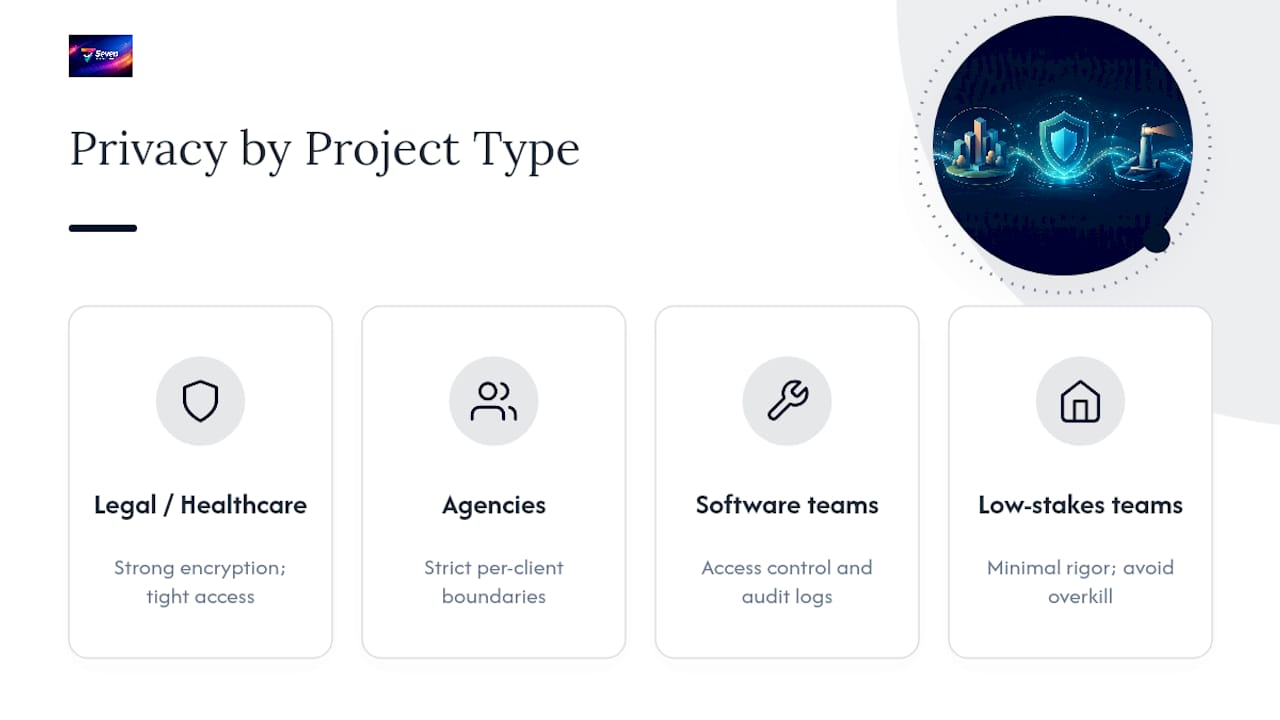
Not every team faces the same stakes, and treating all project data as equally sensitive leads to either overkill or, more commonly, complacency in the areas that actually matter.
Legal and healthcare teams handle data with statutory protection obligations attached, meaning a breach isn't just embarrassing, it can carry regulatory consequences. These teams generally need the strongest verifiable encryption and the tightest access controls, with self-hosting or a heavily audited zero-knowledge SaaS as the realistic floor, not the ceiling.
Agencies and consultancies juggling multiple clients face a different risk: cross-client visibility. A freelancer managing five clients in one workspace needs strict boundaries between projects, since the biggest privacy failure in this category isn't external hacking, it's one client accidentally seeing another client's board.
Software and product teams often care most about intellectual property protection, roadmap confidentiality, and preventing competitive leaks before launch. Their privacy priority skews toward access control and audit logs over encryption alone, since the threat is usually an insider or a departing employee, not an external attacker.
Small internal teams with low-stakes projects, like a household renovation tracker or a hobby group's event planning, genuinely don't need the same rigour. Insisting on self-hosted, audited, zero-knowledge everything for a book club's reading schedule is a solvable problem turned into an unnecessary chore. Match the tool to the actual sensitivity of what you're managing, not to the most extreme case you can imagine.
Practitioner perspective: balancing security, ops and budget
Self-hosting is justified when you have genuine regulatory obligations or a team member who treats patching as part of their job, not an afterthought. Outside that, it's frequently a hidden liability dressed up as control.
The real question isn't "which tool has the best cryptography." It's "who on our team will actually apply security updates on a Tuesday in six months, when nothing has broken yet?" Most teams answer honestly with "nobody," and that answer should decide the deployment model more than any feature comparison.
My rule of thumb: choose a privacy-first SaaS with verifiable, published cryptography unless you can name the specific person responsible for operations and confirm they have the hours to do it properly.
— Greg
Try Seven for privacy-first project management
Seventasks gives you the practical middle ground this whole guide has been building toward: privacy-first architecture without the operational weight of running your own servers. No data mining, no analytics resale, and full export rights mean you're never locked into a platform that quietly treats your project data as a product.

If your team needs flexible workspaces, built-in messaging, and file attachments without hunting for a third integration to patch privacy gaps, Seventasks covers that ground directly. Pricing is transparent: $5 AUD per month for individuals, and $9 AUD per user per month for teams, with no hidden tiers bolted on later. If you're still weighing self-hosting against a managed option, start with the free trial and stress-test the export function early, exactly as the pilot checklist above recommends. Check current plans and start your trial to see whether it fits your team's deployment needs.
Sources
FAQ
What makes a project management tool privacy focused?
A privacy-focused project management tool avoids tracking and analytics harvesting, encrypts data so the vendor can't read it without permission, and publishes verifiable proof like a threat model rather than just marketing claims. Some services fit this definition by not mining user data or selling analytics.
Is self-hosting always more private than SaaS?
No. Self-hosting gives you full control, but without disciplined patching and backups, a neglected self-hosted instance can be less secure than a well-managed SaaS. Privacy-first SaaS with verifiable encryption is often the safer default for teams without dedicated operations capacity.
What is zero-knowledge encryption in project management tools?
Zero-knowledge encryption means the vendor genuinely cannot decrypt your data, because encryption and decryption happen only on your device using keys the vendor never holds. Look for published architecture details, like MSKanban's documented key derivation and encryption design, rather than taking the claim at face value.
Does GDPR apply to project management software?
Yes, if your project boards contain personal data such as client names or employee details and you operate in or serve the EU/EEA. You need a data processing agreement with your vendor and confirmation that deletion requests are actually honoured.
How much does Seventasks cost?
Seventasks costs $5 AUD per month for individuals and $9 AUD per user per month for teams, with no hidden fees layered on top. Both plans include a free trial to test the platform before committing.