

Take regular, structured exports of your project data now. Request JSON or CSV files plus a schema manifest, and test one before you need it. In this context, that's what "SaaS data backup" actually means: a local, restorable copy of your tasks, comments and attachments, not a vendor's disaster recovery promise. Do it because it keeps projects rebuildable, cuts your switching costs, and gives you an audit trail your provider doesn't control.
TL;DR:
- Most small teams should focus on exporting structured project data in JSON or CSV formats with accompanying metadata and a schema to ensure future reusability.
- Regular testing, validation, and quarterly manual exports are crucial for verifying the integrity and usability of backups and avoiding data loss during platform transitions.
- Relying solely on vendor backups risks data inaccessibility during disputes or shutdowns, making owner-controlled exports essential for true data portability.
- Data exports must be stored securely with encryption, access controls, and proper retention policies to protect sensitive information outside the vendor's infrastructure.
- Choosing a platform that prioritizes open data export and easy migration from the start simplifies future transitions and reduces lock-in risks.
Table of Contents
- What Counts as a SaaS Data Backup for Project Management Tools?
- What a Usable Export Package Must Contain
- How Do You Actually Export Your Project Data?
- How Do You Know an Export Actually Works?
- What Should You Demand in Your Contract Before You Sign?
- How Should Export Files Be Secured and Stored?
- Why Regular, Automated Exports Beat One-Off Backups
- Backup vs Export: Why the Distinction Matters
- What Are the Risks of Trusting Your Provider's Backups Alone?
- Where Should You Actually Store Your Backups?
- How Do You Restore Data From a Backup When You Actually Need It?
- How Often Should You Actually Run a Backup?
- Why Export-First Design Should Be a Product Principle, Not an Afterthought
- Try an Export-Friendly Platform Before You Need One
- Where to Read More on Data Portability and Export Standards
- Sources
What Counts as a SaaS Data Backup for Project Management Tools?
Most people searching for "SaaS data backup" actually want one of two very different things. One is enterprise infrastructure: third-party services that create cloud-to-cloud backups of platforms like Salesforce or Google Workspace, restoring entire environments after an outage. The other, and the one that matters to a freelancer or a five-person team running projects through a SaaS tool, is far simpler: a structured, machine-readable export of your own project data that you control, store yourself, and can reload elsewhere if you ever need to.
That second meaning is what this article covers. Your provider likely already backs up its servers against hardware failure. That's not the risk you're managing. The risk is being locked into a platform because your tasks, comments, and files only exist inside it, in a format only its interface can read. A proper backup, in this sense, is really an export you own: a folder of CSV and JSON files sitting on your own drive or cloud storage, readable with or without the vendor's cooperation.
The industry term for the underlying right, if your provider operates in the EU, is data portability. Article 20 guidance from EU regulators recommends exactly this: structured, commonly used, machine-readable formats like JSON, CSV or XML, packaged with enough metadata to support genuine reuse. That standard is worth knowing even outside the EU, because it's the clearest benchmark for what a "good" export actually looks like.
What a Usable Export Package Must Contain
A ZIP file full of PDFs is not a backup. It's a paper trail. If you can't reload the data into a spreadsheet or another tool without retyping it, it hasn't actually protected you from anything.
A genuinely usable export bundles several categories of data together, and misses on any one of them will bite you later:
- Core objects: tasks, subtasks, comments, attachments, user records, timestamps, custom fields and activity history — not just the task titles.
- Structured formats: JSON for nested or relational data (a task with subtasks and comments), CSV for flat tables you'd want to open in a spreadsheet.
- A schema or manifest file: field types, relationships between objects, and enum values (what does status code "3" mean?) documented in a schema.json or README.
- Attachment handling: original file names, file paths, size limits noted, and some way to confirm each file arrived intact.
- Paging for large accounts: incremental or date-scoped exports so a two-year-old project archive doesn't choke a single request.
Practitioner guidance from the UK's data protection regulator is blunt about the manifest point: without a data dictionary, recipients often can't reliably reuse what's been exported, no matter how complete the raw files are, according to the ICO's guidance on data portability. One practical layout, recommended in engineering guidance for SaaS exports, packages everything as a ZIP containing a manifest.json, a schema.json, a /data folder of per-entity CSV or JSON files, an /attachments folder with checksummed files, and a validation report confirming row counts and checksums. That structure alone solves most of the "can I actually use this later" problem.
How Do You Actually Export Your Project Data?
You've got three realistic paths, depending on account size and how comfortable you are with an API.
- Use the built-in UI export first. Most project management tools have a bulk export button somewhere in settings. Run it, then immediately check two things: did attachments come with the export or just links to them, and did it grab archived or completed projects, not just active ones? Partial exports are the single most common mistake here.
- Call the API for anything beyond a handful of projects. Look for an export endpoint (something like
/api/v1/data-exportis a common pattern) that accepts filters for project or date range and returns a job ID rather than the file itself. Poll that job ID until it reports done, respecting whatever rate limit the API documents. - Expect an async pipeline on large accounts. Bigger exports get handled as background jobs: a worker pages through your data, writes it to temporary storage, and hands you back a short-lived signed URL once it's ready. This pattern, recommended in SaaS engineering guidance for exports, keeps large jobs from timing out or hammering the production database, and the signed URL should expire rather than sit open indefinitely.
Before you request anything, confirm who on your team is authorised to pull the export (admin only, or any project owner?), how they'll authenticate the request, and where the downloaded file will live once it lands, ideally somewhere with its own backup, not just a laptop desktop.
Pro Tip: Run a small test export on one project before you ever need the full one. If the schema file is missing or the attachments didn't come through, you want to find that out on a Tuesday afternoon, not the day you're leaving the platform.
How Do You Know an Export Actually Works?
An export you've never opened isn't a backup. It's a hope. Verification means proving the file can be rebuilt into something usable, not just confirming it downloaded.
Run these checks, roughly in order:
- Compare row counts in the exported CSV or JSON against what the platform's own UI reports for tasks, comments and attachments.
- Validate the data against the schema.json, if one is included, catching type mismatches before they become import errors.
- Verify checksums on attachment files against the manifest to confirm nothing was truncated or corrupted in transit.
- Do a dry-run import into a spare project, a spreadsheet, or a lightweight database, rather than trusting the file will "probably work" later.
- Check attachment metadata, file sizes, MIME types and the parent task reference, matches what the manifest claims.
| Check | What it catches | Tooling needed |
|---|---|---|
| Row count comparison | Missing or truncated records | Spreadsheet or simple script |
| Schema validation | Field type mismatches, broken relationships | JSON schema validator |
| Checksum verification | Corrupted or incomplete attachment files | Standard checksum utility |
| Dry-run import | Whether the export is actually reloadable | Staging project or database |
Do this quarterly, and again immediately after any vendor upgrade or schema change on the platform's end, since that's when field names and formats are most likely to shift underneath you. Keep the validation reports themselves, not just the exports, somewhere logged and dated. If you ever need to prove your data was intact on a given date, that report is the evidence.
What Should You Demand in Your Contract Before You Sign?
Verification only works if the export exists and arrives on schedule, and that's a contract problem, not just a technical one.
- Insist on an explicit bulk export or termination assistance clause naming the format (JSON or CSV, not "reports available on request"), the scope (all projects, all attachments, all history), and a delivery window. A two-week delivery window is workable; anything significantly longer can be a red flag.
- Ask for a sample export before you sign, not after. A vendor that hands one over readily, complete with a schema, is signalling it takes portability seriously. Procurement guidance on vendor risk treats this as one of the clearest predictors of lock-in exposure you can test pre-contract.
- Build the export drill into your operations, not just your legal file. Run it quarterly, define who approves large exports, and log every request in an audit trail so nothing gets pulled or deleted without a record.
- Watch for the actual red flags: exports offered only as PDFs, exports that cost extra, or a support team that stalls when you ask "can I see a sample?" Any of those three means the platform is optimised to keep your data in, not to let you leave cleanly.
- Get legal and product teams reading from the same document. A contract clause promising a 14-day export window is worthless if nobody on the product side has built the tooling to actually deliver it that fast.
Quarterly testing paired with explicit contract language is, according to procurement research on SaaS switching costs, the most effective mitigation against getting stuck. Staged, role-gated offboarding, where legal-hold exceptions are logged before anything gets deleted, is the operational backbone that makes those contract terms mean something in practice.
How Should Export Files Be Secured and Stored?
An export file sitting unencrypted on a shared drive is a new liability, not a safety net. The same care your provider takes with your live data needs to follow the data once it leaves.
- Export files should be encrypted at rest, and downloads should happen over HTTPS via signed, time-limited URLs rather than a permanent public link.
- For genuinely sensitive datasets, ask whether the platform offers customer-side encryption, where you hold the keys rather than the vendor.
- Role-based access controls and audit logs should cover who requested an export and who downloaded it, not just who has admin rights generally.
- If your data touches EU data subjects, GDPR portability guidance sets a practical benchmark: structured, machine-readable formats with proper metadata, and a working expectation of fulfilment within 30 days of a request.
- Set a retention policy for the export files themselves. Old exports pile up fast, and each one is a copy of sensitive project data that needs its own secure deletion schedule.
One detail worth knowing if jurisdiction matters to your organisation: hosting the export pipeline on regionally scoped infrastructure can reduce exposure to foreign legal orders reaching your data, a consideration some SaaS implementation guides flag directly for security-conscious teams.
Why Regular, Automated Exports Beat One-Off Backups
A backup you took eighteen months ago tells you almost nothing about the project that's live today. Projects change weekly, sometimes daily, and a stale export is a false sense of security dressed up as a safety net.
Automating the export, rather than relying on someone remembering to click the button, removes the single biggest point of failure in any backup plan: human inconsistency. A scheduled export that runs itself every week or month means you're never more than a few days behind if something goes wrong, whether that's an accidental bulk deletion, a billing dispute that locks your account, or a platform outage that stretches longer than expected.
There's a second, quieter benefit. Automated, scheduled exports create a running history of your project data over time, not just a single snapshot. That gives you the ability to look back and see what a project looked like a month ago, which matters if you ever need to reconstruct a timeline for a client dispute or an internal audit.
Small teams tend to treat backups as a one-time setup task: export once when you're worried, then forget about it. Treat it instead as a recurring calendar item, ideally something your platform or a lightweight script handles on autopilot, so protecting your data doesn't depend on someone's memory on a busy week.
Backup vs Export: Why the Distinction Matters
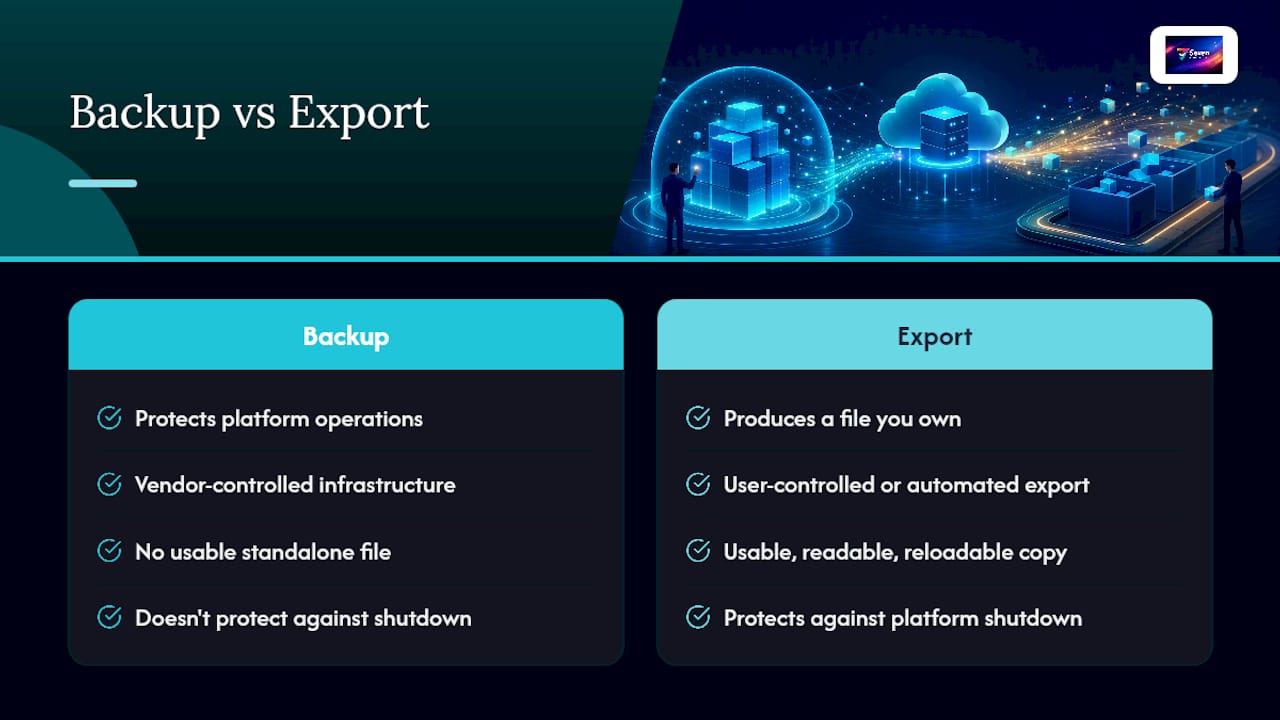
These two words get used interchangeably, and that's where most of the confusion, and false confidence, comes from.
A backup, in the enterprise infrastructure sense, is something a vendor runs on its own servers to protect against hardware failure, data corruption, or an internal outage. It protects the platform's operations. It does not, in almost every case, give you a copy you can hold, read, or reload somewhere else. You can't request "the backup" and get a usable file; that infrastructure exists to restore the vendor's systems, not your standalone copy of the data.
An export, by contrast, is a deliberate action you take, or configure to happen automatically, that produces a file you own and control. It's the export, not the vendor's internal backup, that protects you against vendor lock-in, a pricing dispute, or a platform shutting down entirely.
The confusion matters because plenty of small teams assume their provider's disaster recovery infrastructure covers them personally. It doesn't. If your account gets suspended over a billing error, if the vendor pivots its product, or if you simply want to switch platforms, the vendor's internal backup system is irrelevant to you. Only your own exports get you your data back. Treat "the vendor backs up their servers" and "I have a usable copy of my project data" as two completely separate facts, because they are.
What Are the Risks of Trusting Your Provider's Backups Alone?
Relying entirely on a vendor's internal backup system leaves you exposed in ways that only become obvious at the worst possible moment.
The first risk is access, not data loss. Your data can be perfectly intact on the vendor's servers while you're locked out of it entirely, over a billing dispute, a terms-of-service flag, or an account compromise. A vendor backup that only the vendor can access does nothing for you if the vendor is the one blocking you.
The second is format dependency. Even if you regain access, your data might only exist in a proprietary structure that's expensive or slow to convert. A vendor advisory piece on evaluating lock-in risk before signing notes that platforms which can't readily produce a sample export on request are the clearest early warning of this problem.
The third is business continuity risk. SaaS companies get acquired, pivot product lines, or shut down. When that happens, the window to get your data out can be short and poorly communicated, sometimes a matter of weeks. If your only copy of two years of project history lives inside a platform that's winding down, you're negotiating from a position of zero leverage.
None of this means providers are acting in bad faith. It means their backup systems are built to protect their business, not yours. The two interests overlap most of the time, but they're not the same thing, and the gap only shows up when you need it not to.
Where Should You Actually Store Your Backups?
A single export sitting on one laptop is barely better than no export at all. Spread the risk the same way you'd spread any other important asset.

Cloud storage (a separate provider from your project management tool, like a general-purpose cloud drive) is the easiest starting point: accessible from anywhere, usually versioned, and cheap for the volumes a small team generates. The catch is you're still trusting a third party, just a different one.
On-premises storage, a drive physically in your office or home, gives you full control and no ongoing subscription cost, but it's vulnerable to fire, theft, or simple hardware failure if it's your only copy.
Hybrid storage, cloud plus a local copy, is the standard practical answer for a small team. It costs a bit more setup time, but a single point of failure taking out your only backup is exactly the scenario a proper backup strategy exists to prevent.
Whichever storage path you choose, apply the same rule the export architecture guidance applies to the export process itself: keep an audit record of what was backed up, when, and where, not just the files themselves. A backup nobody can locate six months from now isn't meaningfully different from no backup.
How Do You Restore Data From a Backup When You Actually Need It?
Restoration is where most backup plans quietly fail, because nobody tests them until the day they're desperately needed.
Start with the manifest or schema file, if your export included one, to confirm what's actually in the archive before you try to load anything. Match the field names and relationships it documents against whatever tool you're importing into, whether that's a new project management platform, a spreadsheet, or a simple database.
For a full platform switch, most teams go entity by entity: import users and workspaces first, then tasks and subtasks, then comments and activity history, then attachments last, once everything they reference already exists in the new system. Attachments are usually the trickiest step, since file paths and references can break if the folder structure doesn't match what the manifest describes.
Run the restoration as a dry run first, into a staging project or a throwaway spreadsheet, before you touch anything live. This is exactly the same validation process covered earlier for testing exports, and it's worth repeating here for a reason: a restoration you've never rehearsed is a restoration you can't trust when it counts. If the dry run throws errors, you want to find that out with time to fix it, not during an actual platform migration under deadline pressure.
How Often Should You Actually Run a Backup?
There's no universal number here, but the pattern that works for most small teams is layered rather than singular.
Run an automated export weekly if your team touches dozens of tasks a day, or monthly if activity is lighter. Layer a full, complete export (everything, every project, every attachment) quarterly, timed to line up with the verification drills covered earlier in this piece.
Trigger an extra export outside the schedule after any major change: a platform version upgrade, a pricing plan change, a significant contract renewal, or anytime you're actively negotiating with a vendor over anything. Those are exactly the moments account access risk spikes, and having a fresh export in hand costs you nothing if you never need it.
Small teams often default to reactive backups, exporting only when something's already gone wrong. By then it's too late to catch a slow data corruption issue or a partial export bug before it's baked into months of work. A scheduled cadence, even a simple monthly calendar reminder, beats a "we'll do it when we remember" policy every time.
Why Export-First Design Should Be a Product Principle, Not an Afterthought
Most project management platforms treat data export as a compliance checkbox, something bolted on to satisfy a regulation rather than built into how the product actually thinks about your data. That's backwards, and it shows the moment you actually need the export to work.
Seventasks was built on the opposite premise: your data belongs to you, not to the platform hosting it. That shows up in concrete ways, open data export with no artificial restrictions, Excel import so switching in doesn't cost you a rebuild, and a firm no on data mining or selling analytics, because a platform that profits from studying your data has an incentive misaligned with letting you leave easily.
Practically, that means flexible workspaces and file attachments that were designed from the start to be portable, not retrofitted after the fact. It's a smaller decision than it sounds, but it's the one that determines whether an export three years from now is a five-minute task or a support ticket that goes nowhere. Run a test export on your current platform this week, and see how it stacks up against a proper manifest and schema.
— Greg
Try an Export-Friendly Platform Before You Need One
If you've read this far, you already know the platforms worth trusting are the ones that make leaving easy, not the ones that make staying the only option. Seventasks is built around that principle directly: open data export in structured formats, Excel import so migrating in doesn't cost you a weekend, and a written commitment to never sell or mine your project data for analytics.

Pricing stays transparent too, $5 a month for individual users and $9 per user for teams, with no hidden tiers that unlock export functionality later. You can check the full breakdown on the Seven pricing page, and read exactly how encryption and access controls are handled on the security and compliance page before you commit to anything. Start with the seven-day free trial, run a sample export on a real project, and see whether the manifest and file structure hold up to the verification steps covered earlier. If you're evaluating Seven as your next project management platform, that test costs you nothing and tells you everything about how the vendor treats your data on the way out, not just on the way in.
Where to Read More on Data Portability and Export Standards
For the regulatory detail behind the export standards covered here, the EDPB's data portability guidelines and the UK ICO's portability guidance are the primary sources worth bookmarking. For the technical side of building or evaluating an export pipeline, Veld Systems' breakdown of export architecture covers manifest design and async job patterns in more depth than most vendor documentation offers.
Sources
- Guidelines on the right to data portability (EDPB/EU guidance)
- ICO guidance — right to data portability (UK ICO)
- SaaS data export and portability: what to build and why it matters (Veld Systems)
- SaaS vendor lock-in: how it happens, what it costs, and 6 ways to avoid it (SaaS True Cost)