

A minimalist project management system is a tiny set of task fields plus one workflow, and that combination is enough to plan and finish real work. The fastest way to start: provision a privacy-first workspace like Seventasks, or open a local board, then import your top 20 tasks from a spreadsheet. That's the whole setup.
What you're keeping:
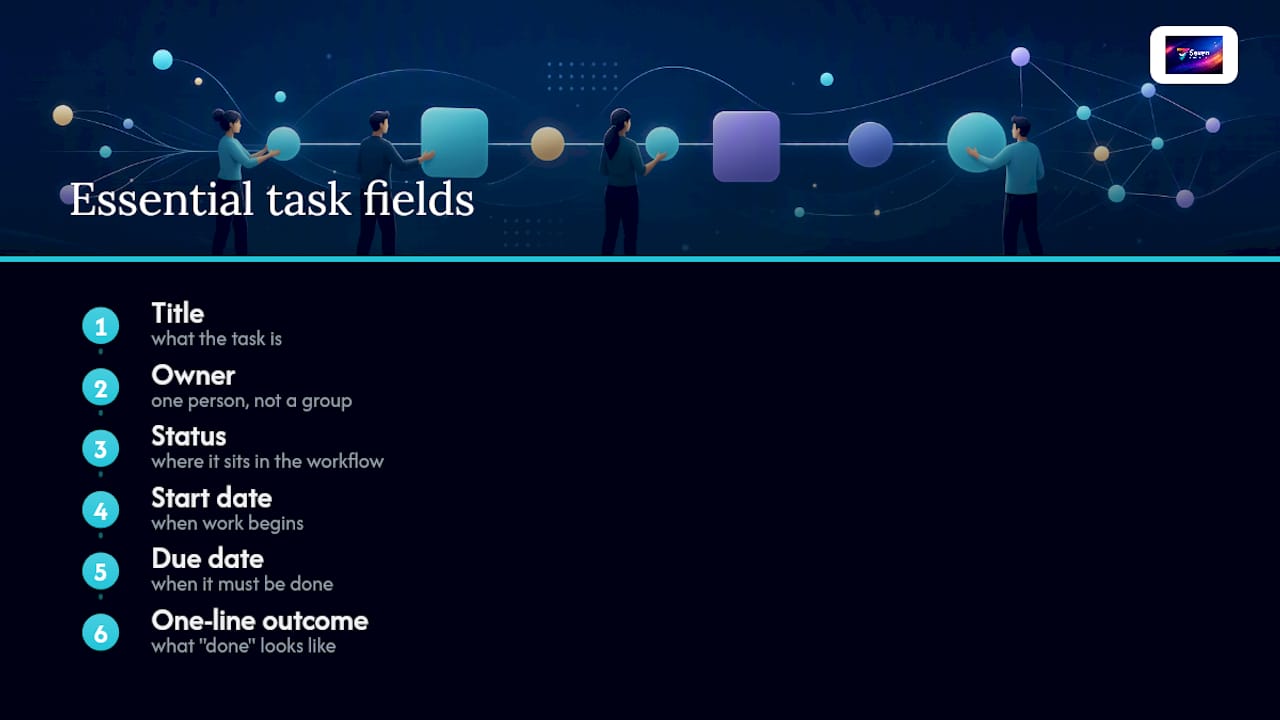
- Fields: title, owner, status, start date, due date, one-line outcome
- Workflow: Do / Doing / Done (three columns, nothing else)
- Storage: a single exportable source, whether that's a hosted workspace, a todo.txt file, or a local board like MikroPlan
- Governance: one owner per task, one triage session per week, no parallel status systems
If you're a solo operator or running a team of two to seven, this is the entire system. Everything below explains how to enforce it, set it up in an afternoon, and recognize when you actually need more.
Key Takeaways
A minimalist project management system works because it limits fields to six, enforces one workflow, and keeps a single person accountable for every task.
| Point | Details |
|---|---|
| Six fields only | Keep title, owner, status, start date, due date, and one-line outcome; drop everything else. |
| Do / Doing / Done | Three columns cover every workflow state a small team needs; add nothing until a real problem requires it. |
| One afternoon setup | Import 20 tasks, set fields, assign a triage lead, and run one 30-minute session to start. |
| Scale by signal | Add structure only when you see repeated missed deadlines, ownership disputes, or more than seven contributors. |
| Seventasks for teams | Privacy-first, export-open, and import-ready at $5/month individual or $9/user/month for teams, with a 7-day trial. |
Table of Contents
- What does minimalist project management actually mean?
- The core rules that keep a minimal system minimal
- A ready-to-use workflow template you can copy today
- How to choose a tool that won't grow on you
- When should you add more structure?
- How to set up your minimal system in one afternoon
- Why Seventasks fits the minimalist criteria
- The part most guides won't tell you
- Seventasks gives you a minimal system without the setup overhead
- Sources
What does minimalist project management actually mean?
Minimalist project management is intentionally limited surface area. Fewer fields. Fewer states. One workflow. Clear ownership. The goal isn't to strip out structure entirely; it's to keep only the structure that directly helps you plan, track, and finish work, and cut everything else.
The six fields that earn their place are: title (what the task is), owner (one person, not a group), status (where it sits in the workflow), start date (when work begins), due date (when it must be done), and one-line outcome (what "done" looks like). Each of these answers a question someone will actually ask during a weekly check-in. Drop any of them and you'll recreate it informally in Slack or email, which is worse.
What minimalism is not: featureless. A system with no due dates and no ownership isn't minimal, it's broken. The difference is that a minimal system enforces just enough structure to prevent confusion, not enough to create what Task Minimal's designers call "process machinery" — the nested subtasks, multi-state workflows, and mandatory taxonomy setups that block actual work rather than support it.
Pro Tip: Pick one canonical place for every task and never split the list. A task that lives in both your email and your board is a task no one owns. Prefer formats that are importable and exportable by default, so you're never locked into a single tool.
The core rules that keep a minimal system minimal
The hardest part of minimalist task management isn't setting it up. It's keeping it small six weeks later, when someone suggests "just one more field." These rules are the defense.
Hard limits:
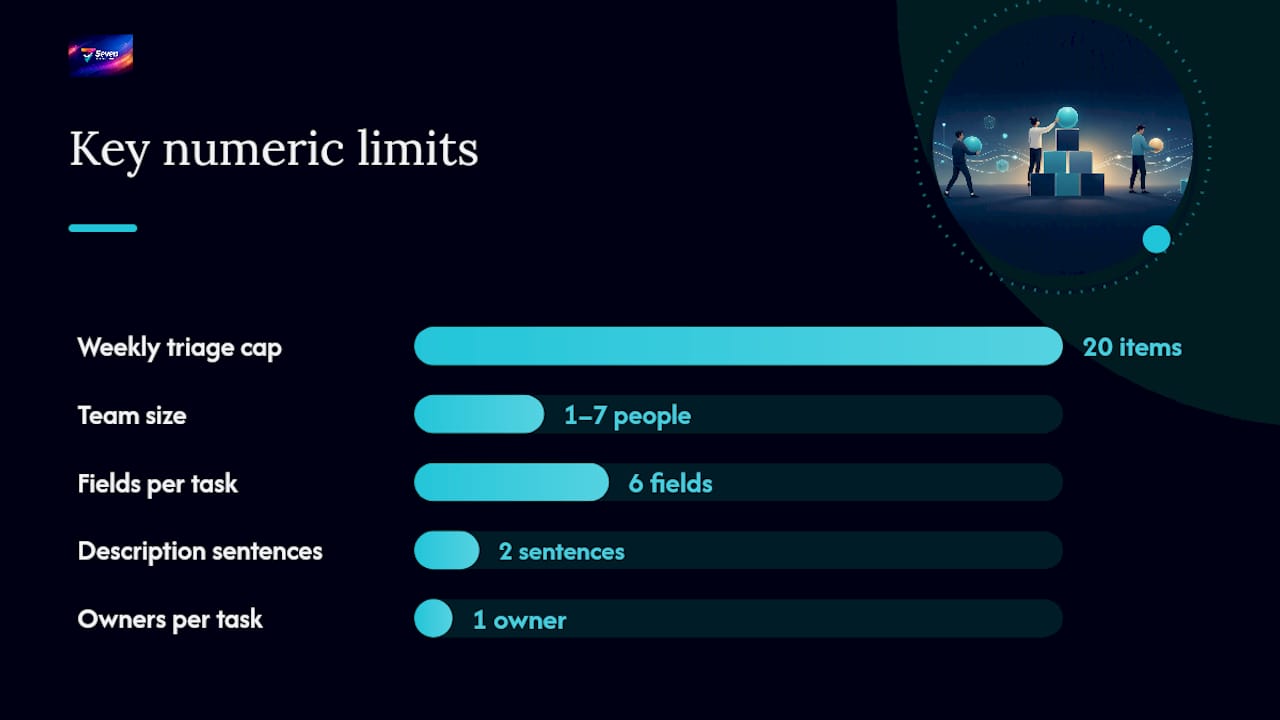
- Maximum six fields per task card (the six above; no exceptions without a team vote)
- No nested subtasks; break large work into separate tasks instead
- One status per task at any moment; no "in review AND in progress" combinations
- One owner per task, always; "the team" is not an owner
- Description field capped at two sentences; longer context goes in an attachment
Operational rules:
- One inbox for new requests (a single column or email alias)
- Weekly triage capped at 20 items; anything beyond that gets deferred or dropped
- Archive completed tasks monthly rather than deleting them (you'll want the history)
- Default to an exportable format: CSV, JSON, or plain text
Governance for small teams:
- One meeting per week, focused on the board, capped at 20 minutes
- Versioned exports before any structural change to the board
- A written team agreement (one page, pinned) that states the rules above
Micro formalizes exactly this kind of minimal governance for teams of one to seven, with defined cyclic activities and a deliberately short list of management tasks. It's worth reading even if you don't adopt it wholesale.
Pro Tip: Enforce minimalism by policy first, tool settings second. A team agreement that says "no nested subtasks" is easier to maintain than hunting through tool settings every time someone joins. Keep it small from day one; shrinking a bloated system later costs real time.
A ready-to-use workflow template you can copy today
The Do / Doing / Done board
Three columns. That's the entire workflow. Here's what each means in practice:
Do holds everything that's planned but not started. Tasks sit here until someone picks them up. The column is ordered by due date, with the most urgent at the top. Nothing moves here without an owner and a due date.
Doing holds active work only. A healthy board has two to four items here per person, never more. If someone has eight tasks in Doing, the column is lying. Move the real ones back to Do.
Done is the archive column for the current week. At the end of each weekly triage, completed tasks get exported and cleared. MikroPlan implements exactly this three-column structure with local IndexedDB storage and JSON export, so you can run it without any cloud dependency.
Minimal task card fields
For a micro-project running two to five days, this card is the entire record. No separate project brief, no status report, no separate risk log. The outcome field does the work of all three.
How to choose a tool that won't grow on you
The right tool for a minimal system is the one that gets out of your way. Here's the checklist to run during a 30-minute trial:
- Can you create a task in under 10 seconds without filling in mandatory fields?
- Does it export to CSV or JSON without a premium plan?
- Can it run offline or store data locally?
- Does it default to a simple board without requiring taxonomy setup first?
- Is the pricing page clear, with no hidden per-feature costs?
- Does the privacy policy state that your data isn't used for analytics or AI training?
If any answer is no, that's a signal. Tools that fail items 1 or 2 tend to grow into the system rather than serve it.
How tool categories compare on minimalist criteria
Skuld is a strong example of the CLI category: a single-file, offline task tracker with atomic writes and soft-deletes, no network access, and a stable output format for scripting. todo.txt sits in the flat-file column: a plain-text format that supports priorities, dates, projects, and contexts, and works with dozens of apps across every platform.
For teams that need collaboration alongside minimalism, a hosted workspace with a clear privacy policy and open export is the practical middle ground.
Pro Tip: Run your 30-minute trial with real tasks, not dummy data. Import five actual tasks from a spreadsheet and try to complete the weekly triage flow. If the tool slows you down during that test, it'll slow you down every week.
When should you add more structure?
Minimalism is a default, not a religion. These signals mean the current system is costing you more than it saves:
- Repeated missed deadlines on tasks that had clear owners and due dates. The system isn't the problem, but adding explicit dependency tracking (task B can't start until task A is done) usually fixes it.
- Ownership disputes on more than one task per week. Add a "reviewer" field before adding a second owner; one person still decides, one person checks.
- More than seven active contributors on a single board. At this size, a lightweight milestone layer (not extra statuses, just named checkpoints) prevents the board from becoming unreadable.
- Cross-team dependencies that aren't visible on the board. Add a single "blocks/blocked by" field rather than a separate dependency management tool.
- Regulatory or audit requirements that demand a paper trail. Switch to versioned exports on a fixed schedule (weekly ZIP, stored in a shared folder) before adding any new fields.
When you add something, test it for one week before treating it as permanent. If the new element doesn't prevent a real problem that occurred in the previous two weeks, remove it. That's the only governance rule you need for incremental changes.
How to set up your minimal system in one afternoon
This playbook works for one person or a team of up to seven. Budget three to four hours the first time.
- Choose your workspace (30 minutes). Pick one tool: a hosted workspace like Seventasks, a local board, or a flat-file format. Don't evaluate more than two options. The cost of deciding is higher than the cost of switching later.
- Import or copy your top tasks (30 minutes). List your 20 most active tasks in a spreadsheet with six columns: title, owner, status, start, due, outcome. Import that file. If your tool doesn't support import, paste manually — 20 tasks takes about 15 minutes.
- Set the six fields and defaults (15 minutes). Disable or hide any field the tool adds by default that isn't in your six. Set status options to exactly: Do, Doing, Done.
- Invite collaborators with role limits (15 minutes). Assign one triage lead (the person who runs the weekly session). Everyone else is a contributor. No admin access for contributors.
- Run a 30-minute triage (30 minutes). Move every task to the right column. Set or confirm due dates. Identify anything with no owner and assign it or drop it.
- Schedule the weekly sync (5 minutes). One recurring 20-minute meeting, same time each week, focused on the board only. No agenda document needed.
Roles and responsibilities
| Role | Responsibility |
|---|---|
| Owner | Accountable for one task; updates status before the weekly sync |
| Triage lead | Runs the weekly session; enforces the 20-item cap |
| Reviewer | Optional; checks Done tasks against the outcome field before archiving |
Cost guidance: local-first and open-source tools cost nothing. Hosted SaaS tiers for individuals typically start at $5/month; small teams pay per user. Avoid any plan that locks export behind a paywall. That single restriction is the clearest sign a tool isn't built for your independence.
Why Seventasks fits the minimalist criteria
Seventasks meets the core checklist in ways that matter for small teams:
- Privacy-forward: no data mining, no analytics sales, no AI training on your tasks. The team is independent, which means your work stays yours.
- Open export: data export without vendor lock-in is a stated design principle, not a premium feature.
- Excel import: paste your spreadsheet and your tasks are in. No reformatting, no migration service.
- Flexible boards: single-board workspaces with simple default fields. You don't have to configure a taxonomy before creating your first task.
- Built-in messaging and file attachments: keeps context inside the task rather than scattered across email threads.
- Due-date tracking and overdue alerts: the two features most minimal systems need and most minimal tools skip.
Pricing is transparent: $5/month for individuals, $9/user/month for teams, with a 7-day free trial. Check the pricing page before committing; there are no hidden per-feature costs.
One trade-off worth naming: a hosted workspace is simpler than managing local files, but it requires trusting the vendor. Seventasks publishes its security and compliance documentation openly, which is the right starting point for that evaluation.
Pro Tip: When you first set up Seventasks, disable every field you don't recognize and add them back only when a real problem requires them. Starting sparse is easier than pruning later.
The part most guides won't tell you
The failure mode in minimalist project management isn't choosing the wrong tool. It's the slow accumulation of "helpful" additions that each seem reasonable in isolation.
A team runs a clean three-column board for two months. Then someone adds a priority field because one task got missed. Then a "waiting on" status because two tasks were blocked. Then a notes field because the outcome field felt too short. Six months later, the board has nine fields, five statuses, and a weekly meeting that runs 45 minutes. Nobody planned for that. It just grew.
The pattern is consistent: features get added to solve a communication problem that the team hasn't named yet. The right fix is almost always a conversation, not a new field. When a task gets missed, ask why before adding a priority flag. When something is blocked, put "BLOCKED:" in the title for one week and see if that's enough. Usually it is.
The teams that stay minimal long-term treat the board as a shared agreement, not a tool. The rules are written down, reviewed quarterly, and changed only by consensus. That's the actual discipline. The tool is almost secondary.
Seventasks gives you a minimal system without the setup overhead
Most of the friction in adopting a lean project workflow comes from configuration: building the board, setting fields, figuring out permissions, importing existing work. Seventasks removes that friction without removing your control.

You get a privacy-first workspace with open data export, Excel import, built-in messaging, and due-date alerts, all at $5/month for individuals or $9/user/month for teams. No feature gates on export. No analytics on your tasks. The 7-day free trial starts without a credit card commitment, so you can import your top 20 tasks and run one full weekly triage before deciding anything. For teams that need reassurance on data handling, the security documentation covers the specifics.
Sources
The tools and formats below are worth exploring hands-on. Each one demonstrates a different flavor of minimal PM, from plain-text files to local Kanban boards to lightweight process frameworks.