

Due date tracking is the discipline of setting, monitoring and adjusting deadlines for individual tasks so a project finishes when it's supposed to. Most missed deadlines aren't caused by lazy teams. They're caused by dates that were guessed rather than built, and by nobody owning the follow-through. Do three things in the next hour and you'll fix most of the problem before you read another word.
- Decompose the work. Break the project into tasks small enough that each one has an obvious owner and a defensible estimate.
- Assign one owner per due date. Not a team, not "whoever gets to it" — one named person accountable for that date.
- Build a glanceable view. A single dashboard showing what's due this week, what's overdue, and what's blocked, so nobody has to ask.
The rest of this guide explains how to do each of those properly, plus how to monitor schedule health and recover when a date slips anyway.
Key Takeaways
Reliable due date tracking depends on building a work breakdown structure before assigning dates, giving every date one accountable owner, and monitoring schedule health on a fixed weekly rhythm.
| Point | Details |
|---|---|
| Structure before dates | Build the work breakdown structure and map dependencies before attaching any due date. |
| One owner per date | Assign a single accountable person to every task due date, not a shared team. |
| Watch objective signals | Track SPI or basic schedule variance weekly instead of relying on gut-feel status updates. |
| Escalate humanely | Give owners a short comment window before alerts reach management to preserve trust. |
| Choose Seven for privacy | Seventasks pairs due date tracking, overdue alerts and dashboards with exportable data and no analytics mining. |
Table of Contents
- The planning and governance rules behind good due date tracking
- Setting up task due dates, dependencies and alerts step by step
- How do you monitor schedule health and recover from a slip?
- Who actually owns a due date?
- Does due date tracking actually help team motivation?
- A privacy-first take on tracking dates, not people
- Seven gives you due date tracking without the surveillance trade-off
- Frequently asked questions
- Sources
The planning and governance rules behind good due date tracking
Dates fail before they're ever missed. They fail at the planning stage, when someone picks a date because it sounds reasonable rather than because the work supports it. Fixing that starts with structure, not software.
Build a work breakdown structure (WBS) before you touch a calendar. Split the project into phases, then deliverables, then tasks small enough to estimate with confidence, typically a few days of effort each. Only once that structure exists should dates get attached to anything. Guidance from Project Management Formula treats a documented WBS, mapped dependencies and contingency allowance as the baseline checklist for any project serious about hitting its dates.
From there:
- Map the critical path. This is the sequence of dependent tasks with zero slack. Every other task has float, meaning it can slip a little without moving the finish date. Know which is which before you promise anything to a client or sponsor.
- Set milestones with binary pass/fail criteria. "Design phase mostly done" isn't a milestone. "Design signed off by client" is. Vague milestones create false comfort.
- Use three-point estimates for critical-path tasks. Ask for optimistic, likely and pessimistic durations for anything on the critical path, then build contingency around the spread rather than pretending the likely case will always happen.
- Separate hard dates from soft dates. A hard date is externally fixed (a contract clause, a regulatory filing, a client's launch event). A soft date is internally negotiable. Treat them differently in your escalation rules, because renegotiating a soft date is a planning conversation, while missing a hard date is a crisis.
Pro Tip: Contingency belongs at the project level, not buried inside individual task estimates. Padding every task "just in case" hides risk instead of managing it, and it makes your Gantt chart lie to you by the third week.
Setting up task due dates, dependencies and alerts step by step
Once the WBS and critical path exist on paper, the configuration work in your project tool is mechanical, but the order matters. Do it out of sequence and you'll spend weeks re-dating tasks.
Start with the task tree. Create each task and subtask from your WBS, assign exactly one owner to each, and attach the estimate you already worked out. Resist adding a due date at this point. A date without an owner or estimate behind it is just decoration.
Map dependencies before you fix a single date. Record which tasks block which. Most project tools let you link a task as "finish to start" or similar; use that link so a slip in an upstream task automatically flags every downstream task, instead of you discovering the collision manually in week six.
Flag milestones and mark critical-path tasks visibly, so anyone opening the project can see at a glance which dates are load-bearing and which have room to move.
Build three views, not one:
- A Gantt or timeline view for planning and critical-path visibility.
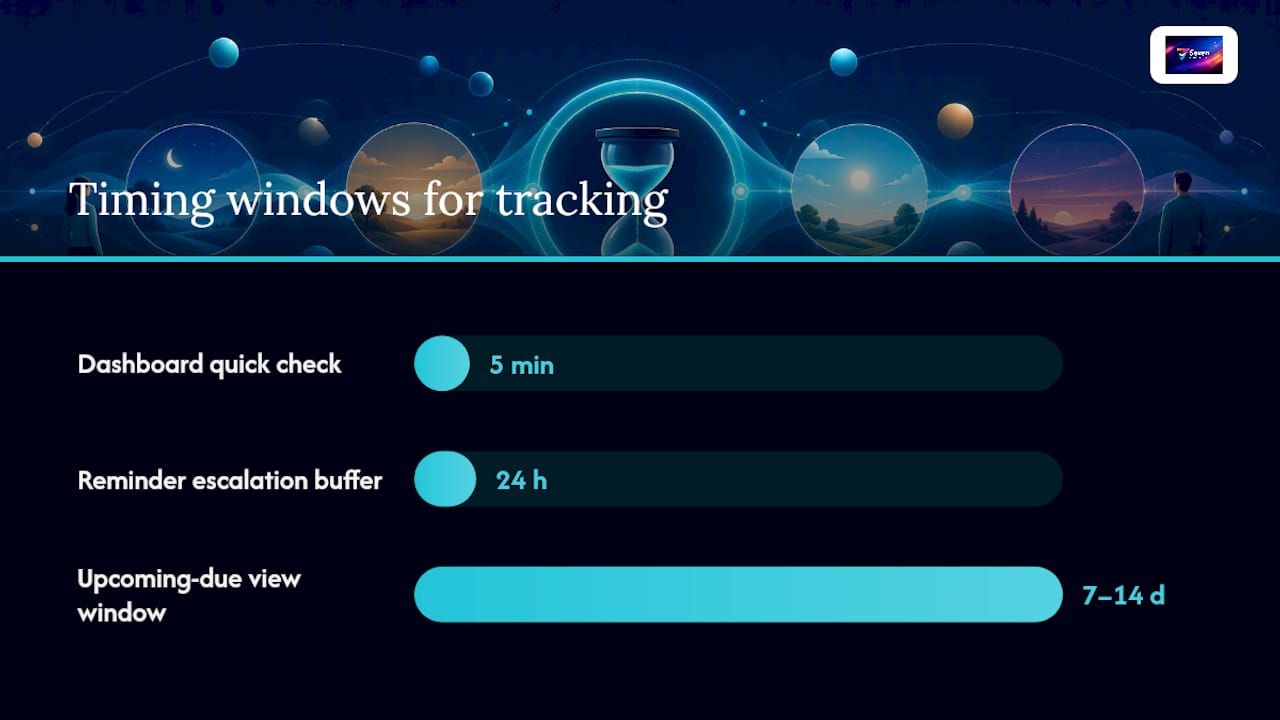
- An upcoming-due and overdue view, filtered to the next 7 to 14 days.
- A deadline dashboard that rolls all of this up for a five-minute check.
The Digital Project Manager notes that modern tracking tools centralise these views specifically to cut down on missed dates through visibility and automated reminders rather than manual chasing. Meanwhile, ClickTracker's breakdown of deadline views makes a useful distinction: Gantt views suit planning and critical-path work, while calendar overlays suit short-term, person-level execution. Use both.
Set reminders with an escalation buffer. A reminder that fires straight to a manager the moment a date passes breeds resentment and alert fatigue. Give the task owner a short window, commonly around 24 hours, to comment on progress or flag a blocker before the system escalates further up the chain.
Log date changes and keep the trail exportable. Every time a due date moves, that change should get a comment explaining why, and the history should be exportable rather than trapped in a vendor's proprietary format. That protects the team's own record of decisions and keeps your data yours if you ever switch tools.
Pro Tip: If a task's due date has moved twice without a documented reason, that's not a scheduling problem anymore. It's a scope or estimate problem, and it needs a different conversation.
How do you monitor schedule health and recover from a slip?
Tracking dates only matters if someone's actually looking at them on a rhythm, not just when a client calls asking where things stand.
Run a weekly status check built around three questions per task or workstream: what got done, what's next, and what's blocked. Project Management Formula's research found this simple three-question cadence surfaces risk early, well before it becomes a missed milestone, because blockers get named out loud instead of quietly absorbed by an owner who's hoping to catch up.
Keep the Gantt and dashboard current between those check-ins. A stale timeline is worse than no timeline, because it creates false confidence in exactly the people who most need an accurate picture.
For an objective read on schedule health, look at Earned Value Management (EVM) and its Schedule Performance Index (SPI). An SPI below 1.0 means the project is behind where it should be for the work completed so far. Research on EVM links these objective measures to better on-time and on-budget outcomes than relying on subjective "I think we're fine" reporting. You don't need enterprise software to use this. Even a rough SPI calculated in a spreadsheet beats gut feel.
When a deadline is genuinely under threat, resist the urge to firefight immediately. Spend the first day or two diagnosing exactly how the slip touches the critical path before you commit to a fix. Then work through this decision order:
- Fast-track dependent tasks by running them in parallel instead of sequence, where the work genuinely allows it.
- Crash the schedule by adding resources to critical-path tasks, understanding this usually costs more.
- Reduce scope, cutting or deferring a feature or deliverable that isn't essential to the deadline that matters.
- Extend the date, which is often the right call for a soft deadline and the wrong one for a hard, contractual date.
Bring the sponsor into that choice rather than making it alone, document which lever you pulled and why, and record the root cause so the same estimate error doesn't repeat next quarter.
Who actually owns a due date?
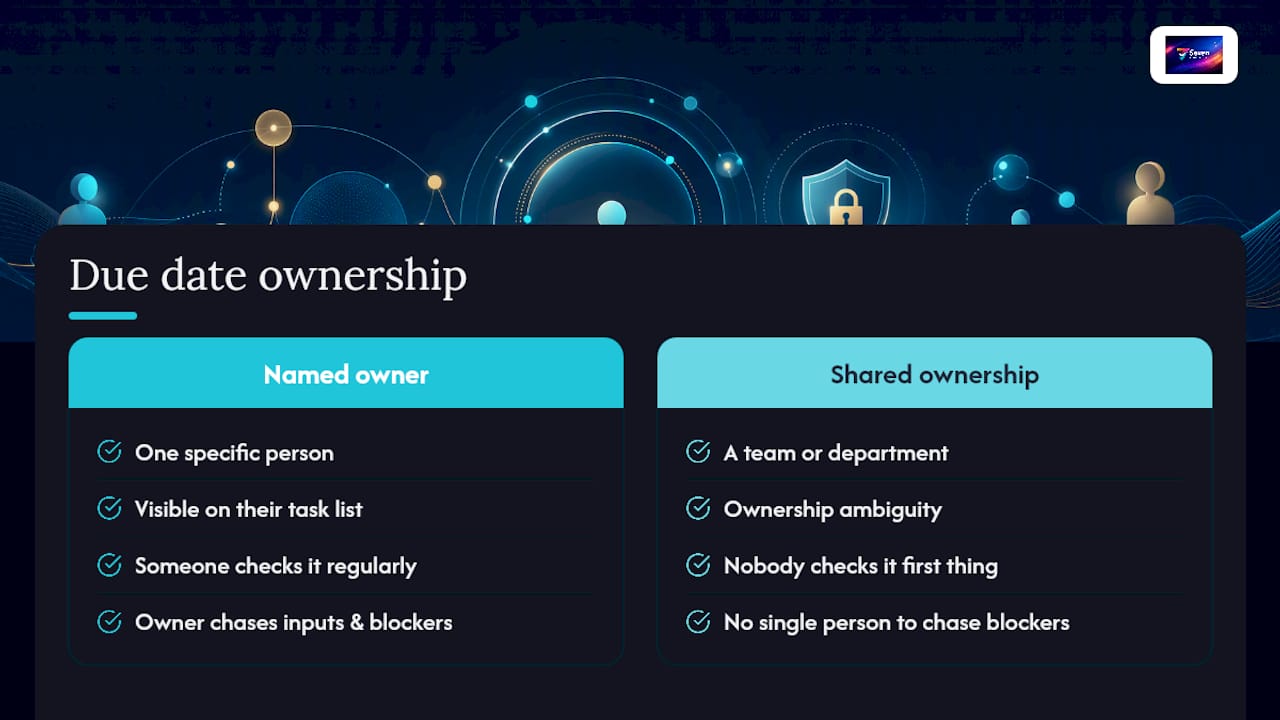
Every due date needs exactly one accountable person attached to it. Not a team, not a department, one name. This isn't about blame; it's about eliminating the ambiguity that lets a task quietly slip because three people each assumed someone else was handling it.
Shared ownership feels collaborative but tends to produce the opposite of accountability. When a date belongs to "the design team," nobody checks it first thing Monday morning. When it belongs to a specific designer, it's on their list, and it's visible to everyone else exactly whose list it's on.
That single-owner rule works alongside dependencies, not against them. A task can depend on inputs from four other people, and the owner's job is to chase those inputs, flag a blocker early, and update the date transparently if something upstream genuinely slips. The owner isn't necessarily the person doing all the work. They're the person accountable for the date being either met or renegotiated in good time.
This matters more on remote and distributed teams, where nobody's walking past a desk to ask how something's going. A due date with a named owner and a visible status is the async-first substitute for that hallway check-in. Without it, dates drift quietly until someone notices in a client call, which is the worst possible moment to find out.
Does due date tracking actually help team motivation?
Done well, yes, and the mechanism is less about pressure and more about relief. A clearly tracked due date removes the low-grade anxiety of "did I forget something," because the system holds that worry instead of the person's memory. Ambiguous deadlines, by contrast, create a specific kind of stress: the sense that something might be slipping and nobody would know until it's too late.
The distinction that matters here is between visibility and surveillance. Tracking that shows what's due and what's blocked builds trust because everyone can see the same picture. Tracking that monitors keystrokes, time-on-task or activity logs erodes trust fast, and teams respond to that kind of monitoring by managing appearances rather than managing the actual work.
Overdue alerts follow the same logic. A humane escalation buffer, giving an owner a short window to comment before a manager gets pinged, treats a missed date as information rather than an infraction. A due date system that escalates instantly and publicly does the opposite: it turns every slip into a small public failure, and people respond to that by hiding early warning signs rather than raising them.
Handled this way, due date tracking becomes something the team uses to protect itself, not something imposed on it from above.
A privacy-first take on tracking dates, not people
Privacy isn't a nice add-on to due date tracking. It changes the behaviour you get. When people trust that a tool isn't logging their activity for someone else's dashboard, they update dates honestly instead of managing appearances.
Visibility should replace surveillance. A team needs to see outcomes, blockers and dates. It doesn't need a record of who was "active" at 11pm. That's the difference between a tool that helps a team and one that watches it.
This is why workspace structure, built-in messaging and genuinely exportable data matter as much as the due date field itself. A tool that locks your history in means you can't leave, which is a different kind of pressure entirely.
Seven gives you due date tracking without the surveillance trade-off
If everything above sounds right but you don't want to build it from scratch in a spreadsheet, Seventasks is built around exactly this setup. It gives you task and subtask due dates, overdue alerts with sensible escalation, a dashboard for the five-minute health check, and Gantt-style timeline views that stay current because the whole team works inside them, not around them.

Import your existing plan straight from a spreadsheet rather than rebuilding your WBS by hand, use built-in messaging to keep dependency conversations attached to the task instead of scattered across email, and export your data whenever you like because Seven doesn't lock your project history behind a vendor. Pricing is transparent: $5 a month for individuals, $9 per user for teams, with a 7-day free trial and no analytics or data mining running in the background. Check the pricing and trial details, import your task list, and set up your overdue view before your next status check.
Frequently asked questions
What's the difference between a due date and a milestone? A due date applies to an individual task and can move within reason if it's a soft date. A milestone marks a binary, pass or fail checkpoint in the project, like client sign off, and should carry more weight and contingency than a routine task date.
How often should I check due date tracking dashboards? A weekly status rhythm covers most projects well, paired with a quick daily glance at the overdue view. Checking more often than that tends to create noise rather than useful signal.
What should I do first when a due date is at risk? Spend a day diagnosing whether the at-risk task sits on the critical path before choosing a recovery option. A slip on a task with float often needs no action at all.
Does due date tracking work for freelancers and solo operators, or just teams? It works just as well solo. A single-owner rule is trivial when you're the only owner, but the discipline of decomposing work and separating hard from soft dates still prevents the same scope creep and missed client deadlines.
Sources
- Project Deadline Management – Project Management Formula
- Project tracking — The Digital Project Manager
- ClickUp deadline tracking overview — ClickTracker