

Asynchronous collaboration is the practice of getting work done and making decisions without requiring everyone to be online at the same time. Contributors read, respond, and build on each other's work on their own schedules, with the work itself carrying the context forward. If your team is remote, hybrid, or simply drowning in meetings, the recommended next step is concrete: run a four-week pilot with one ritual, defined response SLAs, and a single primary async home before expanding further.
Three things determine whether async works for a team:
- Whether the work can tolerate a response delay of a few hours without blocking progress
- Whether the team has the writing discipline to make context self-contained
- Whether leadership is willing to set explicit norms and hold to them
Pro Tip: Don't start with a tool. Start with one ritual, such as a weekly status update or a design review, and fix the norms there first. Tooling is easy to swap; habits are not.
Key Takeaways
Async collaboration works when teams treat it as a default mode with explicit norms, not as a tool layer dropped on top of an existing meeting culture.
| Point | Details |
|---|---|
| Default to async deliberately | Reserve synchronous time for urgent, sensitive, or team-building tasks; move everything else to async. |
| Set SLAs before you start | Define response windows in writing on day one; unwritten SLAs are not SLAs. |
| Measure from a baseline | Track meeting hours, focus hours, and time-to-decision from week one so you have a real signal at week four. |
| Start with one ritual | Fix norms and tooling on a single use-case before expanding; pilot scope determines pilot success. |
| Seventasks for async pilots | Seventasks provides workspaces, built-in messaging, file attachments, and open data export at $9/user/month with a 7-day free trial. |
Table of Contents
- What does asynchronous collaboration actually mean?
- Async vs. synchronous: how to decide which mode to use
- When async collaboration is most effective
- Benefits and tradeoffs: what to expect and what to watch
- How to roll out async collaboration step by step
- Which tools support async work, and how do you choose?
- How to measure whether async collaboration is working
- Common mistakes that derail async teams
- The case for async that most guides miss
- When I'd pick async over sync
- Run your first async pilot with Seventasks
- Sources
What does asynchronous collaboration actually mean?
Asynchronous collaboration covers any work or communication where contributors participate at different times rather than simultaneously. The word "asynchronous" comes from networking, where it describes data transmission that doesn't require a shared clock. Applied to teams, it means the same thing: no shared clock, no required overlap.
Three broad forms show up in real work:
Documentation-led async is the most common. Think Google Docs comments, Notion pages with inline feedback, or a shared spec that collects stakeholder input over 48 hours. The document is the meeting.
Recorded-media async covers Loom videos, screen recordings, and audio messages. A product manager records a five-minute walkthrough of a new feature; engineers watch it when they start their day in a different time zone and leave timestamped questions. Searchable recordings and attached comments dramatically reduce rework in creative and engineering reviews because the context stays attached to the artifact.
Process-driven async is the most structured form. It includes async standups (a daily written update posted to a shared channel), structured decision threads (a proposal posted with a 48-hour comment window and a named decision owner), and templated review cycles. This is where asynchronous collaboration reduces interruptions and enables deep work most visibly, because the process itself enforces the rhythm.
Common async formats you'll recognize:
- Threaded discussions in project channels
- Document comments and tracked changes
- Video walkthroughs with timestamp-linked feedback
- Async standups posted to a shared board
- Structured decision threads with a named owner and a deadline
The task types that favor async are deep work, written reviews, documentation, onboarding materials, and any decision that benefits from a cooling-off period. The types that don't: genuinely urgent issues, emotionally sensitive conversations, and early-stage brainstorming where rapid back-and-forth builds shared understanding faster than any thread can.
Async vs. synchronous: how to decide which mode to use
The most common mistake teams make is treating async channels as a faster version of real-time chat, then wondering why response times feel slow and alignment breaks down. The two modes have fundamentally different contracts with participants.
| Dimension | Asynchronous | Synchronous |
|---|---|---|
| Latency | Hours to a day | Seconds to minutes |
| Context | Self-contained in the message | Shared in the room |
| Participation | Flexible, time-shifted | Simultaneous, required |
| Documentation | Built in by default | Requires deliberate notes |
| Emotional nuance | Lower bandwidth | Higher bandwidth |
Teams should treat async as the default and reserve synchronous time for urgent, sensitive, or team-building activities. Most routine collaborative activities, from status updates to design feedback to written approvals, can move to async formats with the right documentation.
When to default to async:
- The decision doesn't need an answer in under four hours
- The topic is complex enough that people need time to think before responding
- Participants are in different time zones with less than two hours of overlap
- The output needs a written record for future reference
When to sync instead:
- Someone is blocked right now and the blocker is resolvable in under 10 minutes
- The conversation involves conflict, performance feedback, or emotional stakes
- The team needs to build rapport or trust, not just exchange information
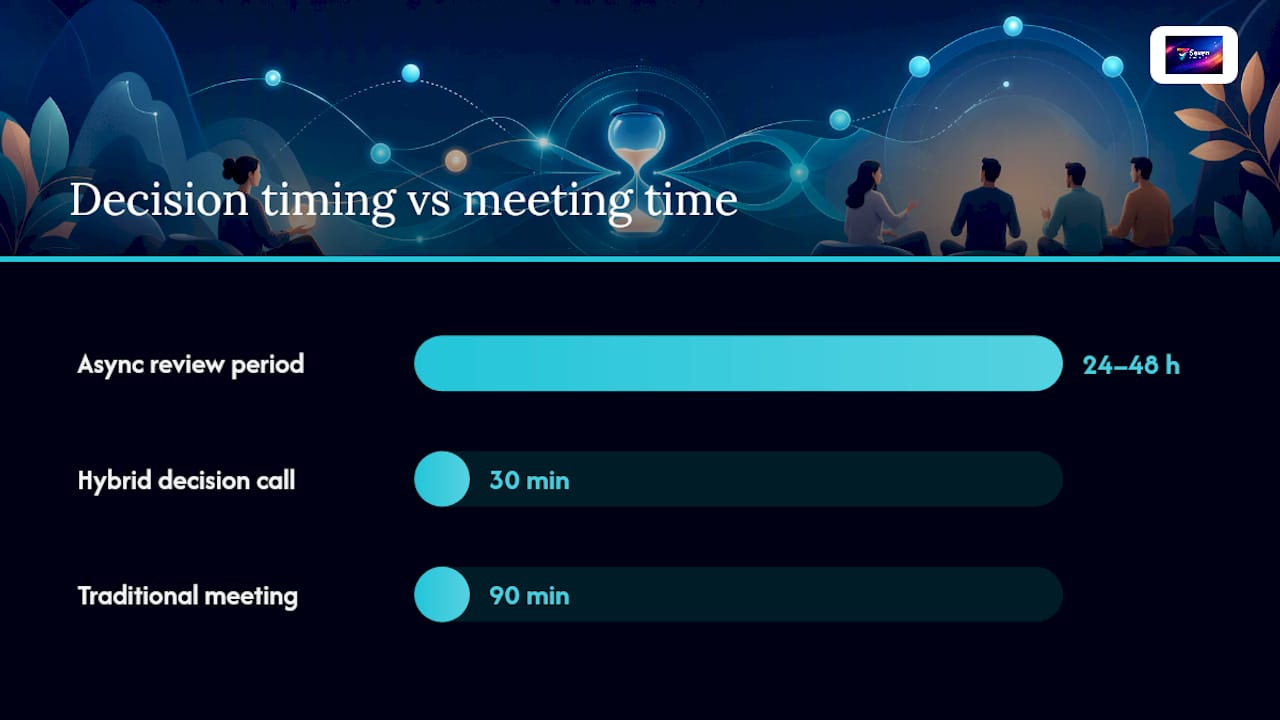
The hybrid pattern that works best: circulate a pre-read or draft asynchronously, collect written input over 24–48 hours, then hold a short synchronous session focused only on unresolved questions. Circulating agendas and draft materials before meetings lets synchronous time focus on decision-making and raises meeting efficiency measurably. A product team using this pattern might share a feature brief on Monday, collect async comments by Wednesday, and hold a 30-minute decision call Thursday, rather than a 90-minute discovery meeting with no pre-work.
A second example: a distributed engineering team posts a pull request with a written description of the change, the tradeoffs considered, and the specific questions they want reviewers to answer. Reviewers respond in their own time. The synchronous standup, if it happens at all, covers only what's blocked.
When async collaboration is most effective
Not every team activity is a good candidate for async. The scenarios below are where async delivers the clearest return.
High-value async scenarios:
- Distributed engineering reviews: Pull request reviews, architecture decision records, and code walkthroughs posted with written context let reviewers engage without scheduling across time zones.
- Design critique: Sharing a Figma file or recorded walkthrough with a structured feedback template collects more considered input than a live critique session where the loudest voice often wins.
- Content and copy reviews: A shared document with a 48-hour comment window produces better feedback than a real-time reading session.
- Onboarding materials: Written SOPs, recorded walkthroughs, and structured knowledge bases let new hires learn at their own pace and revisit content without asking the same questions twice. Digital onboarding built on searchable async artifacts dramatically reduces the time a new hire needs before contributing independently.
- Weekly status updates: A structured written update posted to a shared board replaces a 30-minute all-hands that most attendees didn't need to attend.
- Client feedback loops: A recorded demo with a timestamped comment thread gives clients a way to respond on their schedule and keeps feedback attached to the specific moment in the recording.
Role-specific notes:
Product managers benefit most from async decision threads, where a proposal is posted with context, options, and a named decision deadline. This forces clarity and creates a searchable record.
Designers get better feedback through recorded walkthroughs than live critiques. Frame-accurate comments on a video or pinned comments on a file keep feedback specific.

Engineers can run nearly their entire review and planning cycle async. The exception is debugging sessions, where real-time pair programming often resolves issues faster.
Support teams use async for internal knowledge base updates and escalation documentation, but customer-facing interactions usually require faster response windows.
People ops can move performance check-ins, engagement surveys, and policy updates to async formats. Sensitive conversations, terminations, and conflict resolution stay synchronous.
Checklist to pick your first pilot use-case:
- Does this activity currently require a scheduled meeting?
- Can the output be captured in writing or a recording?
- Can participants tolerate a four-to-eight-hour response window?
- Is there a clear owner who can make the final call?
- Is the team willing to commit to a four-week trial?
If you answered yes to all five, you have a strong pilot candidate.
Benefits and tradeoffs: what to expect and what to watch
The productivity case for async is real, but it comes with genuine tradeoffs that leaders often underestimate.
Primary benefits:
- More deep work time. Reducing unnecessary meetings and favoring asynchronous alternatives frees time for focused work. When a team cuts two hours of low-value meetings per person per week, that time doesn't disappear into email. It tends to show up as longer uninterrupted work blocks.
- Time-zone neutrality. A team spread across New York, Austin, and London can run a full review cycle without anyone joining a call at 7 AM or 9 PM.
- Better documentation by default. Async work produces written artifacts. Those artifacts become onboarding materials, decision logs, and audit trails without any extra effort.
- Clearer thinking. Writing forces precision. A team that communicates async tends to produce clearer proposals and more considered feedback than one that relies on verbal discussion.
Main tradeoffs:
- Slower response times. A four-hour SLA is a feature, not a bug, but it feels like friction to teams used to instant replies. Set expectations explicitly or the async channel becomes a source of anxiety.
- Perceived isolation. Without the ambient social contact of an office or a video call, some team members feel disconnected. This is a real risk, not a personality quirk.
- Misaligned expectations. If one person treats a Slack message as async and another treats it as real-time, the mismatch creates frustration on both sides. Written norms fix this.
Early metrics to track:
- Focus hours recovered per week (target: two or more hours per person)
- Meetings reduced per week (track the delta from baseline)
- Time-to-decision on async threads (target: under 48 hours for most decisions)
Pro Tip: Track focus hours recovered in the first two weeks of the pilot. If the number isn't moving, the team is probably treating async channels as real-time chat. That's a norms problem, not a tool problem.
Industry analyses highlight a rising preference for async among remote workers, with threaded conversations, recorded context, and searchable archives cited as the features that make async work in practice.
How to roll out async collaboration step by step
A failed async rollout almost always has the same cause: the team adopted a tool without changing the underlying norms. The tool becomes another channel for real-time noise, and the experiment is declared a failure within three weeks.
Starter implementation checklist:
- Name a pilot owner responsible for the rollout and weekly check-ins
- Define the pilot scope: one ritual, one team, four weeks
- Set explicit response SLAs (e.g., four hours for project channels, 24 hours for documentation reviews)
- Assign a decision owner for every async thread that requires a resolution
- Choose a single primary async home and commit to it for the pilot duration
- Document the norms in writing and share them before day one
- Schedule a two-week check-in and a four-week retrospective
Async update template (fields to include):
- What I completed since the last update
- What I'm working on now
- What's blocked and what I need
- Any decisions needed from the team (with a deadline)
Async meeting agenda template (fields to include):
- Topic and context (two to three sentences)
- What input is needed from participants
- Options or proposals already considered
- Decision deadline and named decision owner
- Where to post responses
Change management steps:
- Run a 60-minute kickoff session to walk through the norms document together
- Pair each team member with a buddy for the first week to normalize asking questions
- Review the norms document at the two-week check-in and update anything that isn't working
- Measure the pilot KPIs at week four before deciding whether to expand
Pro Tip: The norms document is the most important artifact of the rollout. Keep it short, one page maximum, and make it editable by the whole team. A norm the team wrote together is one they'll actually follow.
Separating chat for synchronous interactions from long-form discussions for asynchronous work reduces distractions and keeps context attached to the work itself. That separation is the single most effective structural change a team can make.
Which tools support async work, and how do you choose?
Tool categories matter more than specific product names, because the right category for your team depends on the type of async work you're doing, not on feature lists.
Tool categories and their primary use-cases:
- Threaded discussion platforms: Organize conversations by topic or project rather than by time. The key feature is threading, which keeps context together. Look for searchable archives and the ability to attach files directly to threads. Attaching conversations to work artifacts reduces distractions and makes future search faster.
- Async video and recording tools: Record walkthroughs, demos, and feedback with timestamp-linked comments. Best for design reviews, onboarding walkthroughs, and any situation where showing is faster than writing.
- Document collaboration platforms: Real-time document editing with comment threads and version history. The async value is in the comment layer, not the simultaneous editing.
- Project and work management platforms: Track tasks, subtasks, deadlines, and handoffs. The async value is in the structured visibility: anyone can see what's in progress, what's blocked, and what's done without asking. When evaluating collaborative planning tools, prioritize searchable history, clear ownership fields, and file attachment support.
- File review and frame-accurate feedback tools: Leave comments pinned to specific frames in a video or specific elements in a design file. Keeps feedback precise and eliminates the "I think it was around the two-minute mark" problem.
Picking a primary async home:
The biggest mistake teams make is spreading async work across too many tools. Pick one platform as the primary home for project-related async communication and commit to it. Everything else is supplementary. The archive and search strategy matters as much as the tool itself: if a decision made six months ago isn't findable in under two minutes, the async system isn't working.
Industry analyses confirm that threaded conversations, recorded context, and searchable archives are the features that separate effective async tools from ones that just add noise.
How Seventasks fits an async pilot:
Seventasks provides workspaces that map directly to the pilot structure: one workspace per team or project, with boards for tracking tasks and subtasks, built-in messaging for threaded async communication, and file attachments that keep context attached to the work. The Excel import feature lets teams migrate existing task lists without rebuilding from scratch, and the open data export means no vendor lock-in if the team's needs change. Seventasks doesn't mine user data or sell analytics, which matters for teams handling sensitive project information. For a four-week async pilot, the structure is straightforward: one workspace, one board per ritual, and the messaging layer with async threads attached to specific tasks.
How to measure whether async collaboration is working
Measurement is where most async pilots fail. Teams run four weeks of async work, feel like something changed, and then can't point to a number. Without a baseline, there's no signal.
KPIs, measurement cadence, and targets:
| KPI | Measurement frequency | Suggested target |
|---|---|---|
| Meeting hours per person per week | Weekly | Reduce by 20% from baseline |
| Deep-focus hours per person per week | Weekly | Increase by 2 hours from baseline |
| Time-to-decision on async threads | Per thread, reviewed weekly | Under 48 hours for most decisions |
| Rework rate on reviewed deliverables | Per sprint or review cycle | Reduce from baseline |
| Onboarding time to first contribution | Per new hire | Reduce over 90 days |
Pilot timeline:
- Week 1: Establish baselines for all KPIs. Run the kickoff session. Post the norms document.
- Week 2: First check-in. Review whether SLAs are being honored. Adjust norms if needed.
- Week 3: Mid-pilot pulse survey. Ask three questions: Is the async channel replacing meetings? Are response times acceptable? Is context self-contained in messages?
- Week 4: Full retrospective. Compare KPIs to baseline. Decide whether to expand, adjust, or stop.
- Weeks 5–8 (expansion phase): If week-four results are positive, add a second ritual or a second team. Don't expand both simultaneously.
The most reliable early signal is meeting hours per person per week. If that number isn't moving by week two, the team is running async tools on top of the same meeting schedule, which defeats the purpose.
Common mistakes that derail async teams
Most async failures are predictable. The patterns repeat across teams and industries, and each one has a straightforward mitigation.
Problem → mitigation pairs:
- Async channels treated as real-time chat: Team members expect instant replies in a Slack channel labeled "async." Mitigation: set explicit SLAs in writing, pin them to the channel, and have the pilot owner model the behavior by not replying instantly.
- Documentation decay: The norms document is written on day one and never updated. By week three, it no longer reflects how the team actually works. Mitigation: assign a documentation owner and schedule a monthly review.
- Fragmented toolsets: The team uses five tools for async communication and no one knows where to look for a decision made last month. Mitigation: pick one primary async home and enforce it. Everything else is supplementary.
- Poor writing quality: Async communication lives or dies on writing clarity. A vague update creates three follow-up questions and defeats the purpose. Mitigation: share a writing guide with the norms document. The async update template above is a good starting point.
- No decision owners: A thread runs for four days, collects twelve opinions, and ends without a resolution. Mitigation: every async thread that requires a decision must name an owner and a deadline in the opening message.
- Isolation and disconnection: Team members feel cut off from the social fabric of the team. Mitigation: keep one synchronous ritual, whether a weekly video call or a monthly team lunch, that is explicitly social and not work-focused.
Pro Tip: Psychological safety in async teams depends on written tone. A short, blunt message reads as cold in text even when it wasn't intended that way. Encourage the team to add one sentence of context or acknowledgment to any message that might land as abrupt. It takes five seconds and prevents a lot of unnecessary friction.
Pro Tip: If a thread runs past 10 replies without resolution, it's a signal to sync. Not every decision belongs in a thread. The rule of thumb: if the async discussion is generating more heat than light, call a 20-minute video call and close it.
The case for async that most guides miss
When I'd pick async over sync
The conventional wisdom on async collaboration focuses on time zones and meeting reduction. Both are real benefits. But the more interesting case for async is what it does to the quality of thinking.
When a team defaults to synchronous discussion, the fastest thinker in the room tends to set the direction. The person who needs 20 minutes to form a considered opinion either speaks before they're ready or stays quiet. Async inverts that dynamic. The written format rewards clarity and precision over speed. A thoughtful engineer who would never interrupt a meeting can write the most useful comment in a thread.
The practical decision rule: if the question is complex enough that the best answer requires more than five minutes of thought, async is almost always the better format. If the question is simple enough to answer in a sentence, a direct message or a quick call is faster.
The one recommendation worth trying this week: take the next meeting on your calendar that has more than four attendees and no clear decision to make. Cancel it. Post a written update with the same information and a comment thread for questions. See what happens. Most of the time, the thread produces better output than the meeting would have, and it takes less of everyone's time.
Run your first async pilot with Seventasks
Seventasks gives distributed teams a clean, privacy-first workspace to run async workflows without the overhead of enterprise tooling or the risk of vendor lock-in.

The platform maps directly to the four-week pilot structure in this guide: one workspace per team, boards for tracking tasks and handoffs, built-in messaging for async threads attached to specific work items, and file attachments that keep context where it belongs. Import your existing task list from a spreadsheet on day one. Export your data any time, in full, with no restrictions. Seventasks doesn't run analytics on your project data or use it for AI training, which matters when your async threads contain sensitive client or product information.
Start with the 7-day free trial at $9 per user per month for teams. Set up one workspace, one board, and the async update template from this guide. By the end of week one, you'll know whether the structure fits.
Sources
The sources below back the specific recommendations in this guide. Each one is worth reading in full if you're building an async practice from scratch.
- How to collaborate effectively if your team is remote
- A Guide to Asynchronous Collaboration in a Remote Work Environment
- Asynchronous Collaboration Guide
- Async — open source web app (async-labs)
- Best Async Collaboration Tools for Remote Teams (2026) | Fastio